


HP OmniBook X Flip 14 – Intel Core Ultra 7 256V, 2K Touchscreen 2-in-1, Copilot+ PC (B5UJ2UA)
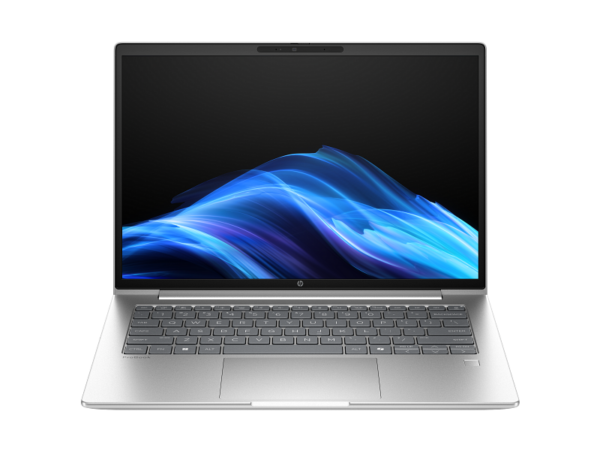
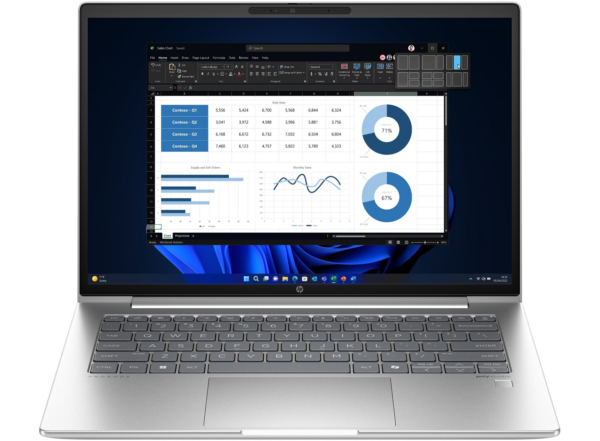
The HP OmniBook X Flip 14 is a premium consumer 2-in-1 convertible built for creative professionals, students, and hybrid workers who need a versatile, AI-capable machine they can use in laptop, tent, tablet, or reverse mode. Unlike the commercial ProBook range, the OmniBook X Flip targets individuals and prosumers rather than IT-managed corporate fleets. Model B5UJ2UA is powered by the Intel Core Ultra 7 256V — a Lunar Lake Series 2 processor with a dedicated 47 TOPS NPU that qualifies this device as a Microsoft Copilot+ PC — and ships with Windows 11 Home pre-installed. Furthermore, the thin 1.46 cm chassis, Atmospheric Blue anodized aluminium finish, and 1.38 kg weight make it one of the lightest and most distinctive 14-inch convertibles in the OmniBook range.
Technical Specifications
Processor
| Attribute | Detail |
|---|---|
| Model | Intel Core Ultra 7 256V (Lunar Lake, Series 2 Core Ultra) |
| Architecture | 8 cores / 8 threads (4 Lion Cove P-cores + 4 Skymont LP E-cores) |
| P-core base frequency | 2.2 GHz |
| P-core Max Turbo | 4.8 GHz |
| LP E-core Max Turbo | 3.7 GHz |
| Cache | 12 MB Intel Smart Cache |
| NPU | Intel AI Boost — 47 TOPS (Copilot+ PC qualified) |
| Lithography | TSMC N3B (3 nm) |
| TDP | 17 W base / 37 W Max Turbo |
Memory
| Attribute | Detail |
|---|---|
| Installed | 16 GB LPDDR5x-8533 MT/s |
| Configuration | On-package (soldered to SoC — not upgradeable) |
| Slots | None |
| Maximum | 16 GB (fixed) |
⚠️ Memory is not upgradeable: The Core Ultra 7 256V is a Lunar Lake SoC where LPDDR5x memory is integrated directly on the processor package. There are no SODIMM slots and no upgrade path. Buyers who anticipate needing more than 16 GB of RAM in the future should factor this constraint into their purchase decision before buying.
Storage
| Attribute | Detail |
|---|---|
| Drive | 1 TB PCIe Gen4 NVMe M.2 SSD |
| Form factor | M.2 (field-replaceable where accessible — verify per teardown) |
Display
| Attribute | Detail |
|---|---|
| Size | 14-inch diagonal |
| HP marketing name | “2K” |
| Actual resolution | 1920 × 1200 (WUXGA / FHD+) |
| Panel type | IPS, multi-touch, edge-to-edge glass |
| Aspect ratio | 16:10 |
| Glass | Corning Gorilla Glass 3 |
| Brightness | 400 nits |
| Colour gamut | 62.5% sRGB |
| Touch | Yes — multi-touch |
| Hinge | 360° convertible |
| Screen-to-body ratio | 89.58% |
Display resolution note: HP markets this display as “2K.” The actual resolution is 1920 × 1200 — the same WUXGA resolution found on the ProBook 440 G11 and ProBook 4 G1i. True 2K (QHD) is typically 2560 × 1440. The 400-nit brightness and Gorilla Glass 3 protection are genuine improvements over standard ProBook panels, but buyers expecting QHD pixel density should note the actual figure. A higher-specification OmniBook X Flip variant is available with a 3K OLED display if pixel density is a priority.
Graphics
| Attribute | Detail |
|---|---|
| GPU | Intel Arc 140V (Xe2 architecture, 8 Xe cores) |
| VRAM | Up to 8 GB shared from system LPDDR5x |
| GPU Max Frequency | 1.95 GHz |
Connectivity
| Attribute | Detail |
|---|---|
| Wi-Fi | Wi-Fi 6E (802.11ax), 2 × 2, Intel AX211 |
| Bluetooth | 5.3 |
Ports
| Port | Specification |
|---|---|
| Thunderbolt 4 / USB-C | 1 × Thunderbolt 4 (40 Gbps, DisplayPort 2.1, USB PD 3.1, HP Sleep and Charge) |
| USB-C | 1 × USB-C 10 Gbps (DisplayPort 1.4a, USB PD 3.1, HP Sleep and Charge) |
| USB-A | 2 × USB-A 10 Gbps |
| HDMI | 1 × HDMI 2.1 |
| Audio | 1 × 3.5 mm headphone/microphone combo |
| SD Card | No |
Port placement note: Both USB-C ports are located on the left side of the chassis, positioned towards the hinge. The Thunderbolt 4 port (closest to the hinge) and the 10 Gbps USB-C port differ in capability — using the wrong port for a docking station will result in a 10 Gbps rather than 40 Gbps connection. Label or mark the Thunderbolt 4 port if the laptop will be used regularly with a dock.
Camera & Audio
| Attribute | Detail |
|---|---|
| Webcam | 5MP IR with Temporal Noise Reduction |
| Microphone | Dual-array digital, integrated |
| Audio system | DTS:X Ultra, Poly Studio, HP Audio Boost |
| Speakers | Dual stereo |
| Sensors | Accelerometer, gyroscope, IR thermal sensor |
Security
| Feature | Detail |
|---|---|
| Windows Hello | Fingerprint reader + IR face unlock via 5MP IR camera |
| Camera shutter | Physical privacy shutter |
| Microphone mute | Dedicated hardware mute key |
| TPM | Firmware TPM 2.0 |
| HP Sure Click | Not standard on Home edition — see Considerations |
Battery & Power
| Attribute | Detail |
|---|---|
| Capacity | 3-cell, 59 Wh Li-Ion polymer |
| Battery life | Up to 22 hours 45 minutes (manufacturer estimate) |
| Fast charge | 50% in 30 minutes (using supplied 65 W USB-C adapter) |
| Adapter | 65 W USB-C power adapter |
Operating System
| Attribute | Detail |
|---|---|
| OS | Windows 11 Home (pre-installed) |
| Copilot+ PC | Yes — qualifies due to 47 TOPS NPU |
| Note | Home edition; lacks BitLocker, domain join, Remote Desktop host |
Sustainability
| Attribute | Detail |
|---|---|
| Materials | Ocean-bound plastic in speaker enclosure and bezel; recycled metal in cover, keyboard frame, base, and hinge caps |
| Keyboard | Keycaps and scissors contain post-consumer recycled plastic |
| Certification | ENERGY STAR certified |
Physical
| Attribute | Detail |
|---|---|
| Colour | Atmospheric Blue aluminium |
| Finish | Sandblasted anodized |
| Dimensions | 31.3 × 21.85 × 1.46 cm |
| Weight | 1.38 kg |
| Modes | Laptop, tent, tablet, reverse |
Use Cases
Creative Professionals and Content Producers
The combination of Intel Arc 140V GPU, 47 TOPS NPU, and a 360-degree IPS touchscreen makes the OmniBook X Flip a capable platform for photographers, graphic designers, and light video editors who need more GPU capability than a standard integrated graphics chip provides. In tent or tablet mode, the touchscreen responds well to stylus input (sold separately), enabling digital sketching, annotation, and photo retouching directly on the display. Moreover, the 1 TB PCIe Gen4 SSD provides ample fast storage for large project files.
Hybrid Workers and Remote Professionals
The device’s four usage modes adapt to varied work environments — laptop mode for desk-based productivity, tent mode for presenting content across a table, and tablet mode for touch-first navigation during commutes or in meetings without a surface. The 5MP IR camera with AI-powered noise suppression through Poly Camera Pro ensures clear video call quality in variable environments. Additionally, the 22-hour battery rating reduces dependence on chargers during travel or back-to-back meeting days.
Students and University Users
At 1.38 kg with a 360-degree hinge and 14-inch 16:10 display, the OmniBook X Flip is a practical campus machine that handles note-taking in tablet mode, presentations in tent mode, and research sessions in laptop mode. The on-device Copilot+ AI features — live captions, Windows Recall, and AI-assisted writing tools — add study-relevant functionality that standard laptops cannot offer. Furthermore, the 1 TB SSD provides generous storage for coursework, project files, and media without requiring an external drive.
AI-Powered Productivity Workflows
As a Copilot+ PC with a 47 TOPS NPU, the OmniBook X Flip delivers the full Microsoft Copilot+ feature set: Recall (searchable AI memory of on-screen content), live captions in 44 languages, auto super resolution for video upscaling, Windows Studio Effects running at all times without CPU overhead, and Paint Cocreator for AI-assisted image generation. These features run locally and do not require an internet connection, making them available in offline environments. However, some Copilot+ features continue to roll out over time and may require Windows updates to activate.
Considerations
Memory Cannot Be Upgraded
This is the most important hardware constraint on this device. The Intel Core Ultra 7 256V integrates LPDDR5x memory directly on the SoC package. There are no SODIMM slots, no memory expansion path, and no way to add RAM after purchase. The 16 GB is permanent. For most professional and creative workflows, 16 GB is sufficient. However, buyers who run memory-intensive workloads — virtual machines, large video timelines, complex 3D scenes, or heavy browser-tab workflows with resource-heavy applications — should carefully assess whether 16 GB meets their long-term requirements before committing to this machine.
“2K” Display Is Actually 1920 × 1200 (WUXGA)
HP markets this display as “2K,” but the actual resolution is 1920 × 1200 — the same WUXGA resolution found on the ProBook 440 G11. This is not QHD (2560 × 1440), which is the resolution most users associate with “2K.” The 400-nit brightness and Corning Gorilla Glass 3 protection are genuine advantages over standard FHD panels. However, at 162 PPI on a 14-inch screen, text and images are adequate rather than exceptionally crisp. A 3K OLED version of the OmniBook X Flip is available separately for buyers who prioritise display sharpness and colour depth.
Windows 11 Home — Not Suitable for Managed Corporate Deployments
Unlike every other product in this catalogue session, the OmniBook X Flip B5UJ2UA ships with Windows 11 Home — not Pro. This means the following enterprise features are absent: BitLocker full-disk encryption, domain join, Active Directory integration, Remote Desktop host, Hyper-V virtualisation, and Group Policy management. Organisations requiring these capabilities should either purchase a Windows 11 Pro upgrade licence separately or select a ProBook-series device that ships with Windows 11 Pro. The OmniBook X Flip is best suited to individual or prosumer use, not IT-managed fleet deployment.
HP Wolf Security Is Not Standard on Home Edition
The HP Wolf Security suite (Sure Click, Sure Start, Sure Run) that features across the ProBook range requires Windows 10 or 11 Pro or higher. It is not available on Windows 11 Home. The OmniBook X Flip ships with a 30-day McAfee Online Protection trial instead. Buyers who require firmware-level endpoint security should factor in a Windows 11 Pro upgrade or select a ProBook-series device.
Stylus Sold Separately
The 360-degree hinge and touchscreen support stylus input, but no stylus is included in the box. An optional HP USB-C Rechargeable Stylus or compatible Microsoft Pen Protocol (MPP) stylus must be purchased separately. Confirm stylus compatibility with the specific MPP version supported on B5UJ2UA before purchasing a third-party pen.
Colour Gamut: 62.5% sRGB
The IPS panel covers 62.5% sRGB — the same coverage as the standard ProBook 440 G11 display. This is adequate for general content consumption, presentations, and office work, but falls well short of the colour accuracy standards required for professional photography, video grading, or print-preparation work. Creative professionals with colour-critical workflows should use a calibrated external monitor or consider the 3K OLED OmniBook X Flip variant, which offers significantly wider colour coverage.
Frequently Asked Questions
Is the HP OmniBook X Flip B5UJ2UA a Copilot+ PC?
Yes. The Intel Core Ultra 7 256V’s dedicated 47 TOPS NPU meets Microsoft’s 40+ TOPS threshold for Copilot+ PC qualification. This unlocks the full Copilot+ feature set in Windows 11: Recall, live captions in 44 languages, Windows Studio Effects running permanently on-device, auto super resolution for video, Paint Cocreator, and Click to Do. These run locally without cloud processing.
Can I upgrade the RAM or storage later?
The RAM cannot be upgraded under any circumstances — it is soldered directly to the Core Ultra 7 256V SoC package. The 1 TB NVMe SSD may be replaceable depending on the service configuration of this specific unit; verify with HP or a qualified service provider before assuming storge replaceability. This is a meaningful distinction from ProBook devices, where both SODIMM slots and M.2 drives are designed for field upgrade.
What are the four usage modes?
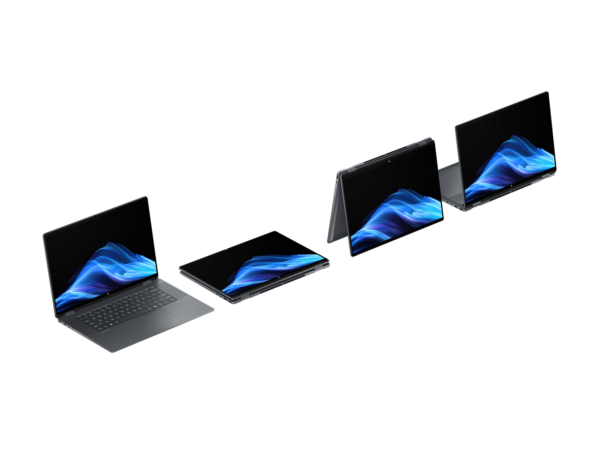
The 360-degree hinge enables: Laptop mode — standard clamshell for keyboard-driven work; Tent mode — A-frame position for sharing screens across a desk or for media consumption; Reverse mode — keyboard facing down, screen facing up, for touch-centric tasks; Tablet mode — lid fully flat, screen facing forward, for stylus input, reading, or presentation control.
Does this laptop include a stylus pen?
No stylus is included in the box with the B5UJ2UA configuration. The display supports Microsoft Pen Protocol (MPP) styluses. An HP USB-C Rechargeable MPP Stylus is available as an optional accessory. Confirm MPP version compatibility before purchasing a third-party stylus.
How does this compare to the ProBook 440 G11?
The OmniBook X Flip B5UJ2UA and HP ProBook 440 G11 CT9P2ET are both 14-inch 16:10 WUXGA Meteor/Lunar Lake laptops — but they serve fundamentally different purposes. The OmniBook X Flip brings a much more powerful NPU (47 vs 11 TOPS), a stronger Arc 140V GPU, a 360-degree hinge, a 5MP IR camera, a 59 Wh battery, and Windows 11 Home pre-installed. The ProBook 440 G11, in contrast, ships with FreeDOS for enterprise imaging, carries HP Wolf Security, supports domain join and BitLocker through a Windows Pro licence, has upgradeable SODIMM RAM, and is built for commercial fleet management. The right choice depends on whether the buyer needs a consumer-grade AI creative machine or an enterprise-managed commercial workstation.
Is Wi-Fi 6E backward compatible with existing routers?
Yes. The Intel AX211 adapter connects on 5 GHz and 2.4 GHz bands on all 802.11ac and 802.11n access points. The 6 GHz band is accessible only on Wi-Fi 6E routers and is not available in all countries — confirm 6 GHz band availability with your network provider.
Related Products
- HP ProBook 440 G11 AI PC Core Ultra 5 125U FreeDOS WUXGA — EMEA Middle East (CT9P2ET)
- HP ProBook 440 G11 AI PC Core Ultra 5 125U FreeDOS WUXGA — HP Africa (A38B9ET)
- HP ProBook 4 G1i 14 AI PC Intel Core Ultra 5 225U FreeDOS WUXGA (CT1H7ET)
- HP ProBook 440 G10 Intel Core i5-1334U 14-inch FreeDOS (9G1Q5ET)
Reviews
There are no reviews yet.