
-
HP Series 5 27″ FHD Monitor – 527sf (94F44AA)
The HP Series 5 527sf delivers a 27-inch Full HD IPS display in black, targeting home users and home office workers who want a larger screen, broad colour coverage, and dual HDMI connectivity in a slim, lightweight form. It shares the 99% sRGB colour gamut, 1500:1 contrast ratio, 300 nits brightness, 100 Hz refresh rate, and Eyesafe® certified HP Eye Ease filter of the white HP Series 5 524sw 23.8″ Monitor — and extends the screen size to 27 inches with two HDMI 1.4 ports instead of one. For users who connect a desktop and a laptop simultaneously, or who switch between a PC and a gaming console, that second HDMI port removes the need for a manual cable swap altogether.
Key Features & Benefits
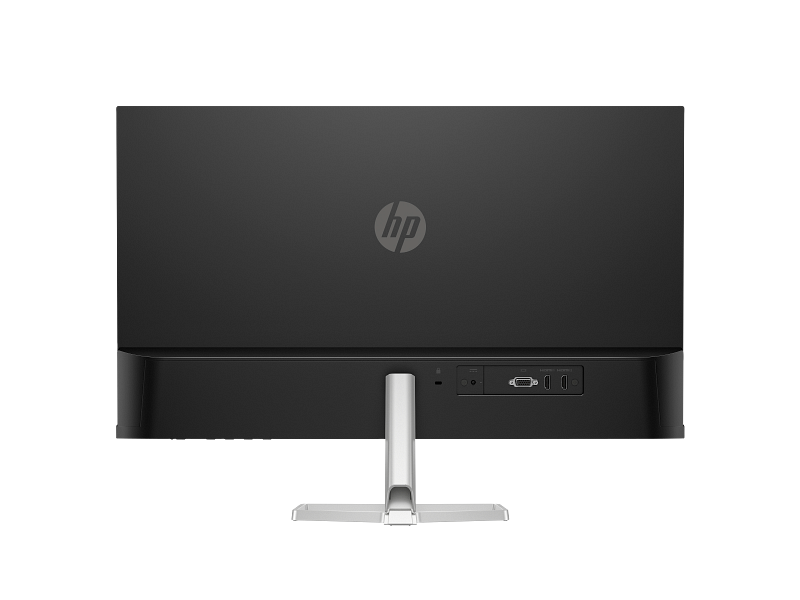
- Two HDMI 1.4 Ports plus VGA: Three video inputs in total give multi-device households a meaningful practical advantage. Users keep a desktop PC on one HDMI port, a laptop or console on the other, and switch inputs from the OSD without touching a cable. The VGA port additionally covers older desktops and legacy workplace hardware.
- 99% sRGB Colour Gamut with 1500:1 Contrast: The IPS panel’s wide colour coverage and above-average contrast ratio produce vivid, accurate imagery for streaming video, photography, and content-rich productivity work — a clear step above the 72% NTSC and 1000:1 contrast typical of Series 3 Pro monitors.
- HP Eye Ease with Eyesafe® Certification: The always-on hardware low blue light filter carries Eyesafe® certification. It cuts blue light output continuously at the hardware level, without shifting colours to a yellow tint or requiring any user action.
- 27-inch, 300 nits Brightness in a Slim 3.42 cm Profile: At just 3.42 cm deep without the stand and 3.2 kg with it, the 527sf occupies minimal desk depth for its screen size. The 3-sided micro-edge bezel maximises the visible area and supports seamless side-by-side dual-screen setups.
- Works with Chromebook Certified and Microsoft WHQL Certified: The 527sf runs natively with Chrome OS, Windows 11, and Windows 10, making it a versatile display for mixed-device households, shared workspaces, and institutions that deploy Chromebooks alongside Windows machines.
Technical Specifications
Display
Specification Detail Screen Size 68.6 cm (27″) diagonal Display Type IPS; LCD, Edge-lit Native Resolution FHD (1920 × 1080) Maximum Resolution 1920 × 1080 @ 100 Hz Aspect Ratio 16:9 Pixel Pitch 0.31 × 0.31 mm Pixel Density 82 PPI Brightness 300 nits (typical) Contrast Ratio 1500:1 (static) Response Time 5ms GtG (with overdrive) Colour Gamut 99% sRGB Colour Support Up to 16.7 million colours (6-bit + A-FRC) Viewing Angles 178° horizontal / 178° vertical Scan Frequency (Horizontal) 30–113 kHz Scan Frequency (Vertical) 48–100 Hz Flicker-Free Yes (TÜV certified) Low Blue Light Yes — HP Eye Ease (Eyesafe® certified, always-on hardware filter) Anti-Glare Yes Bezel Type 3-sided micro-edge Camera None Supported Resolutions
640 × 480 · 720 × 400 · 800 × 600 · 1024 × 768 · 1280 × 720 · 1280 × 800 · 1280 × 1024 · 1440 × 900 · 1600 × 900 · 1680 × 1050 · 1920 × 1080
Connectivity
Port Detail HDMI 2 × HDMI 1.4 (supports up to 100 Hz each) VGA 1 × VGA (supports up to 60 Hz) Audio None USB None Ergonomics & Physical
Specification Detail Tilt Adjustment −5° to +25° Stand Tilt-adjustable slim stand VESA Mount Not supported Security Standard security lock slot Dimensions (with stand) 60.79 × 18.82 × 43.73 cm (W × D × H) Dimensions (without stand) 60.79 × 3.42 × 35.60 cm (W × D × H) Weight (with stand) 3.2 kg Colour Black / Silver Power
Specification Detail Power Supply External power adapter Input Voltage 100–240 VAC, 50/60 Hz Typical Power Consumption 19 W Maximum Power Consumption 24 W Standby Power 0.5 W Operating Temperature 5°C to 35°C Operating Humidity 20%–80% RH (non-condensing) Management & OSD
Feature Detail On-Screen Display Controls Brightness+, Colour, Image, Input, Power, Menu, Management, Information, Exit Management Software HP Display Centre (Ergonomic Setup Guide included; requires Windows 10 or later) Environmental & Certifications
Certification Status ENERGY STAR® Certified EPEAT® Registered Eyesafe® Certified (HP Eye Ease hardware filter) TÜV Rheinland Flicker-Free Certified Works with Chromebook Certified Microsoft WHQL Certified (Windows 11 and Windows 10) NRCS of South Africa Compliant South Africa Energy Compliant Recycled Plastic 85% post-consumer recycled plastic Ocean-Bound Plastic 5% (all plastic parts) Packaging 100% sustainably sourced and recyclable Low Halogen Yes Other Compliance CE, FCC, CCC, BSMI, EAC, KC/KCC, VCCI, ISO 9241-307, ErP, CEL Grade 1, cTUVus, ICES, BIS, NOM, UAE ECAS, UAE RoHS, Vietnam MEPS, CEC, and others In the Box
- Monitor (black / silver)
- HDMI cable
- Power adapter
- AC power cord
- Document kit
Warranty
1 year limited (HP standard — as specified in the HP Product Sheet for 94F44AA; verify local Africa-region terms before publishing)
Use Cases
Multi-Device Home and Home Office Setups
Two HDMI 1.4 ports let the 527sf stay connected to two sources at once — for example, a desktop tower on one input and a laptop on the other. Users switch between them directly from the OSD without unplugging or re-routing cables. This dual-port layout is the 527sf’s clearest practical advantage over the HP Series 5 524sw 23.8″ and HP Series 5 524sa 23.8″, both of which carry only one HDMI port. Furthermore, the VGA port adds a third input option for older hardware.
Content Streaming and Entertainment
The 27-inch panel and 99% sRGB coverage make the 527sf a natural fit for streaming video, watching films, and viewing photography. The 1500:1 contrast ratio produces richer shadow detail than standard 1000:1 IPS panels, giving dark scenes more depth and separation. The 100 Hz refresh rate additionally smooths fast-moving content compared to 60 Hz alternatives, delivering a noticeably more fluid viewing experience.
Student Desks and Shared Household Displays
The slim, lightweight build — 3.2 kg with stand — makes the 527sf easy to position and reposition. Students can run it as a primary productivity and entertainment display, connecting a laptop via HDMI for study sessions and a gaming console or streaming device on the second HDMI port for leisure. No cable changes are needed between the two. The Eyesafe® certified HP Eye Ease filter runs continuously, so extended sessions need no software adjustment.
Dual-Monitor Workspaces
The 3-sided micro-edge bezel creates a minimal visual gap when two 527sf units sit side by side, forming a near-seamless 54-inch combined workspace. The ultra-slim 3.42 cm panel depth keeps the combined footprint unobtrusive on a standard desk. Additionally, at 19 W typical draw, the 527sf ranks among the most power-efficient monitors in the 27-inch category, keeping running costs modest across a dual-screen configuration.
Considerations
No VESA Mount Support
The 527sf does not support VESA mounting. The stand stays fixed and will not detach for use with a monitor arm or wall bracket. This limits buyers who prefer arm-based ergonomic setups or want to free up desk surface beneath the display. Users who need VESA compatibility at 27 inches should look at the HP Series 3 Pro 327pe 27″ FHD Monitor, which offers a 100 × 100 mm VESA mount and a 4-way adjustable stand.
Tilt-Only Stand, No Height Adjustment
The 527sf’s stand tilts from −5° to +25° but provides no height adjustment. Users who need the panel at a precise eye level — particularly those who alternate between sitting and standing — must rely on the tilt range alone, which may not fully compensate for desk height differences. The 527sf therefore suits a fixed desk setup with a consistent seated working posture better than a height-variable one.
No Audio Output
The 527sf carries no integrated speakers and no 3.5 mm audio jack. Audio runs through the host PC or an external device entirely. Users who want monitor-level audio for video calls, streaming, or background music should look at the HP Series 5 524sa 23.8″ with integrated speakers or the HP Series 5 Pro 524da 23.8″ Monitor with Speakers instead.
External Power Adapter and Warranty Term
The 527sf runs on an external power adapter, which contributes to the slim 3.42 cm panel profile but adds a small brick to manage on or under the desk. Additionally, HP’s Product Sheet specifies a standard one-year limited warranty — shorter than the three-year coverage on Series 3 Pro models. Buyers sourcing the 527sf for business or institutional deployments should factor this into procurement planning.
Frequently Asked Questions
Can the HP 527sf be used with a monitor arm?
No. The 527sf does not support VESA mounting, and the stand will not detach for use with a third-party arm or wall bracket. Users who need VESA compatibility at 27 inches should consider the HP Series 3 Pro 327pe, which includes 100 × 100 mm VESA support and a fully adjustable 4-way stand.
Does the HP 527sf have built-in speakers?
No. The 527sf carries no integrated speakers and no 3.5 mm audio jack. The connected PC or external speakers must handle all audio. Users who need built-in audio should consider the HP Series 5 524sa or the HP Series 5 Pro 524da, both of which include dual 2W speakers.
Can I connect two computers at the same time?
Yes. The 527sf provides two HDMI 1.4 ports, so two sources stay connected simultaneously. Switch between them using the Input option in the OSD. A third device connects via VGA, though VGA tops out at 60 Hz.
Is the 100 Hz refresh rate available on both HDMI ports?
Yes. Both HDMI 1.4 ports deliver the 100 Hz maximum refresh rate. The VGA port tops out at 60 Hz because the analogue signal lacks the bandwidth for higher refresh rates.
Does the HP 527sf work with Chromebooks?
Yes. The 527sf carries Works with Chromebook certification and connects via either HDMI 1.4 port — directly or via a USB-C to HDMI adapter for Chromebooks without a native HDMI output.
Does the HP 527sf work with Mac computers?
Yes. The monitor connects via HDMI 1.4 to any Mac with an HDMI output, or via a USB-C to HDMI adapter. HP Display Centre runs on macOS and gives access to the Ergonomic Setup Guide and OSD management.
How does the 527sf compare with the 327pe at 27 inches?
The 527sf delivers higher colour gamut (99% sRGB vs 72% NTSC), higher contrast (1500:1 vs 1300:1), higher brightness (300 vs 250 nits), dual HDMI ports, and Eyesafe® certified HP Eye Ease. The 327pe counters with a 4-way adjustable stand including height, swivel, and pivot; VESA mount support; a DisplayPort 1.2 input; integrated speakers; and a three-year warranty. The 527sf suits content-focused home users; the 327pe fits professional office environments where ergonomics, mounting flexibility, and audio take priority over colour breadth.
Related Products

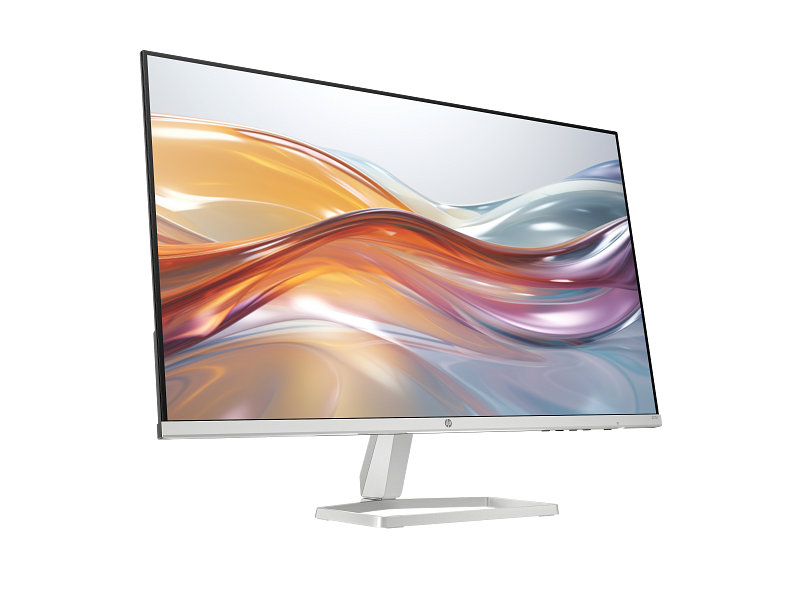
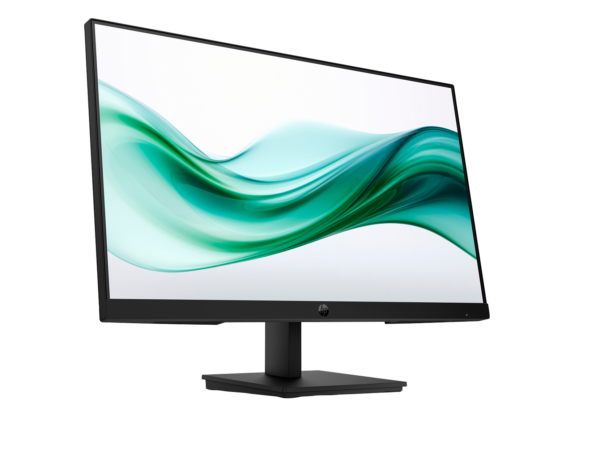 HP Series 3 Pro 23.8" FHD Monitor 324pv, Black - Model No: 9U5C1AS
Original price was: KSh25,000.00.KSh23,800.00Current price is: KSh23,800.00. ( Ex VAT )
HP Series 3 Pro 23.8" FHD Monitor 324pv, Black - Model No: 9U5C1AS
Original price was: KSh25,000.00.KSh23,800.00Current price is: KSh23,800.00. ( Ex VAT )
 HP 527sw Series 5 27" FHD Monitor, White - Model No: 94F46AS
Original price was: KSh28,000.00.KSh26,900.00Current price is: KSh26,900.00. ( Ex VAT )
HP 527sw Series 5 27" FHD Monitor, White - Model No: 94F46AS
Original price was: KSh28,000.00.KSh26,900.00Current price is: KSh26,900.00. ( Ex VAT )
HP 527sf Series 5 27″ FHD Monitor, Black – Model No: 94F44AA
Original price was: KSh25,000.00.KSh24,500.00Current price is: KSh24,500.00. ( Ex VAT )
-2%Key Features & Benefits
- Two HDMI 1.4 Ports plus VGA: Three video inputs in total — a meaningful practical advantage for multi-device households. Users can leave a desktop PC connected to one HDMI port, a laptop or console to the other, and switch inputs from the OSD without touching a cable. The VGA port additionally retains compatibility with older desktops or legacy workplace hardware.
- 99% sRGB Colour Gamut with 1500:1 Contrast: The IPS panel’s wide colour coverage and above-average contrast ratio deliver vivid, accurate imagery for streaming video, photography, and content-rich productivity work — a step above the 72% NTSC / 1000:1 typical of Series 3 Pro monitors at similar or higher price points.
- HP Eye Ease with Eyesafe® Certification: The always-on hardware low blue light filter is Eyesafe® certified, confirmed in the HP Product Sheet. It reduces blue light output continuously at the hardware level, without shifting colours to a yellow tint or requiring any user intervention.
- 27-inch, 300 nits Brightness in a Slim 3.42 cm Profile: At just 3.42 cm depth without the stand and 3.2 kg with it, the 527sf occupies minimal desk depth for its screen size. The 3-sided micro-edge bezel maximises the visible area and supports seamless side-by-side dual-screen configurations.
- Works with Chromebook Certified and Microsoft WHQL Certified: The 527sf is confirmed compatible with Chrome OS, Windows 11, and Windows 10, making it a versatile display for mixed-device households, shared workspaces, and institutions deploying Chromebooks alongside Windows machines.
Related products
-
-10%
 HP Monitors HP Series 5 Pro 23.8" FHD Monitor 524da, Integrated Speakers, Height/Tilt Adjustable, Black - Model No: B11W5ASOriginal price was: KSh30,000.00.KSh27,000.00Current price is: KSh27,000.00. ( Ex VAT )In Stock
 -
-1%
 HP Monitors HP P34hc G4 34" WQHD USB-C Curved Monitor, Integrated Speakers, Height/Tilt Adjustable, Black - Model No: 21Y56ASOriginal price was: KSh72,000.00.KSh71,500.00Current price is: KSh71,500.00. ( Ex VAT )In Stock
 -
-10%
 HP Monitors HP Series 3 Pro 21.45" FHD Monitor, Black - Model No: 9U5A2AAOriginal price was: KSh20,000.00.KSh18,000.00Current price is: KSh18,000.00. ( Ex VAT )In Stock
 -
-1%
 HP Monitors HP 527sh Series 5 27" FHD Monitor, Height/Tilt Adjustable, Black - Model No: 94C50AAOriginal price was: KSh28,000.00.KSh27,800.00Current price is: KSh27,800.00. ( Ex VAT )In Stock
Reviews
There are no reviews yet.