

HP Pro Mini 400 G9 Desktop PC — Intel Core i3-13100T, 8GB DDR4, 256GB NVMe SSD (935X8EA)
The HP Pro Mini 400 G9 is a commercial-grade mini desktop PC designed for organisations that need reliable everyday computing in the smallest possible footprint. Measuring just 177 × 175 × 34 mm and weighing 1.42 kg, it fits behind a monitor, under a desk, or in tight reception and kiosk environments where a tower has no place. Consequently, it suits SMEs, educational institutions, and enterprise IT teams deploying large fleets in space-constrained offices.
Technical Specifications
Processor
| Specification | Detail |
|---|---|
| Processor | Intel Core i3-13100T |
| Generation | 13th Generation (Raptor Lake) |
| Cores / Threads | 4 cores / 8 threads |
| Base Frequency | 2.5 GHz (P-core) |
| Max Turbo Frequency | Up to 4.2 GHz |
| L3 Cache | 12 MB |
| TDP | 35W |
| Integrated Graphics | Intel UHD Graphics 730 |
Memory
| Specification | Detail |
|---|---|
| Installed RAM | 8GB DDR4 |
| Memory Speed | Up to 3200 MT/s |
| SODIMM Slots | 2 (both accessible) |
| Maximum Supported | 64GB DDR4 |
Storage
| Specification | Detail |
|---|---|
| Primary Drive | 256GB PCIe NVMe M.2 SSD |
| M.2 Slots | 2 (2280 and 2242 form factors supported) |
| Optical Drive | Not available (mini chassis) |
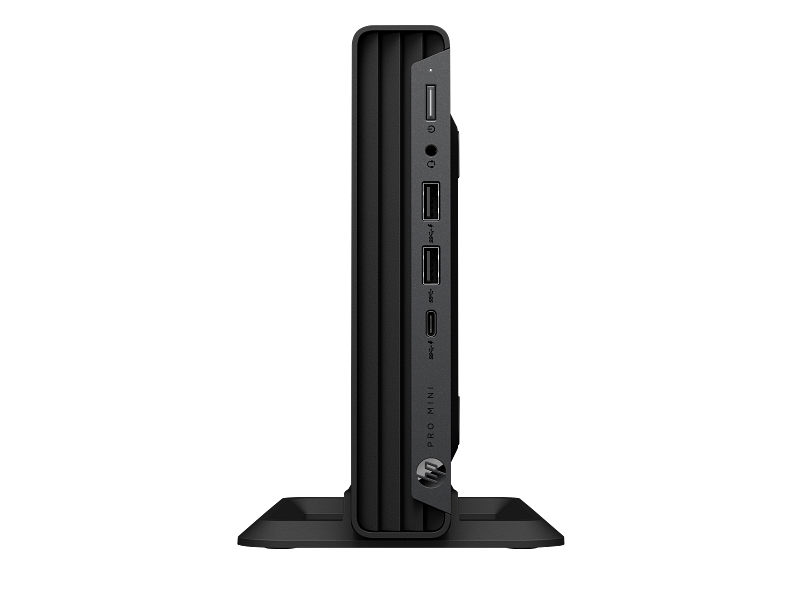
Connectivity — Front Panel
| Port | Detail |
|---|---|
| USB Type-A (10Gbps) | 1× SuperSpeed USB 3.2 Gen 2 |
| USB Type-A (10Gbps, charging) | 1× SuperSpeed USB 3.2 Gen 2 with charging |
| USB Type-C | 1× SuperSpeed |
| Audio | 1× headphone/microphone combo (3.5mm UAJ) |
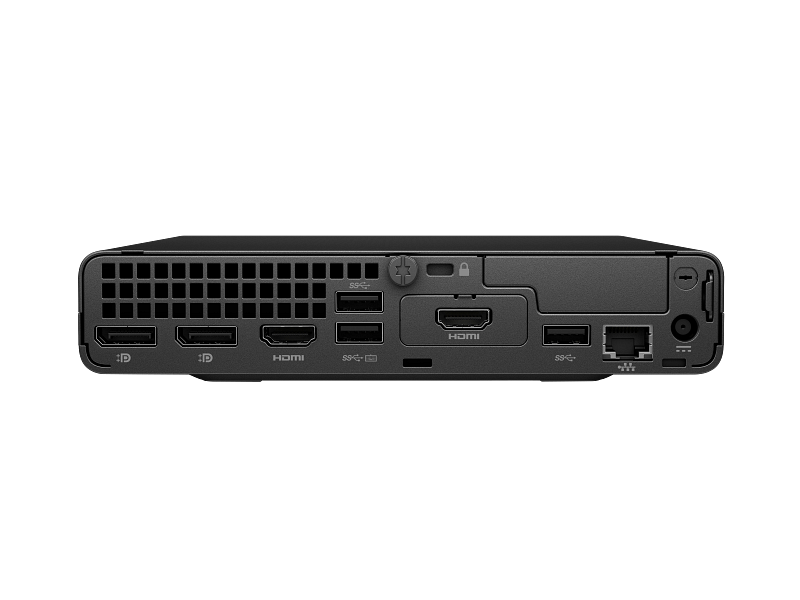
Connectivity — Rear Panel
| Port | Detail |
|---|---|
| USB Type-A (10Gbps) | 1× SuperSpeed USB 3.2 Gen 2 |
| USB Type-A (5Gbps) | 2× SuperSpeed USB 3.2 Gen 1 |
| Display outputs | 2× DisplayPort 1.4, 1× HDMI 2.1 |
| Network | 1× RJ-45 Gigabit Ethernet (10/100/1000) |
| Flex IO port | Optional — choose from: serial, VGA, DisplayPort, HDMI, or USB-C with DisplayPort output |
| Security | 1× Kensington cable lock slot |
Networking
| Specification | Detail |
|---|---|
| Wired | Integrated Gigabit Ethernet (Intel I219-LM) |
| Wireless | Optional — Wi-Fi 5, Wi-Fi 6, or Wi-Fi 6E + Bluetooth 5.3 (add-in card) |
Chipset & Platform
| Specification | Detail |
|---|---|
| Chipset | Intel Q670 |
| vPro support | Platform-compatible (processor-dependent) |
Security
| Feature | Detail |
|---|---|
| TPM | Hardware TPM 2.0 |
| Endpoint Security | HP Wolf Security support |
| Physical | Kensington cable lock slot |
| VESA mounting | 75mm and 100mm VESA (sleeve required, sold separately) |
Power
| Specification | Detail |
|---|---|
| Power Supply | 90W external AC adapter |
| Input | 19.5V / 4.62A |
Dimensions & Weight
| Specification | Detail |
|---|---|
| Width × Depth × Height | 177 × 175 × 34 mm (6.97 × 6.89 × 1.34 in) |
| Weight (unit only) | 1.42 kg (3.13 lbs) |
| Colour | Black |
Operating System & Accessories
| Specification | Detail |
|---|---|
| Operating System | FreeDOS (OS-agnostic; compatible with Windows 10/11 Pro, Ubuntu, and others) |
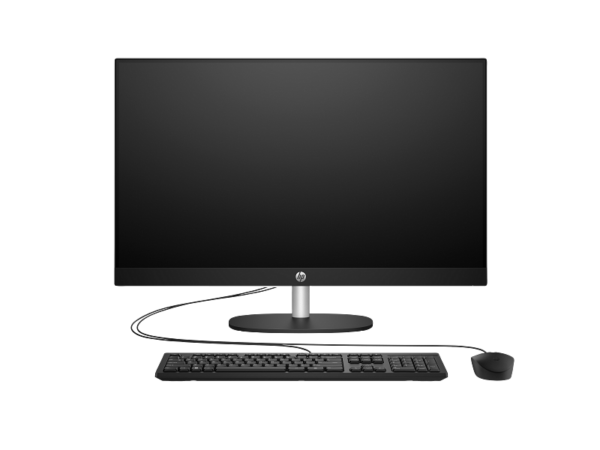
| Included Peripherals | HP 125 wired USB keyboard and mouse (configuration-dependent) |
| Warranty | 1-year limited hardware warranty |
Use Cases
Space-Constrained Office and Reception Deployments
The 34mm height means the HP Pro Mini 400 G9 fits in places where no tower can — behind a reception monitor, inside a media cabinet, or mounted under a sit-stand desk. IT administrators rolling out multiple units benefit from a consistent, standardised footprint across an estate. Furthermore, the optional VESA sleeve removes the desktop unit entirely, producing a clean, cable-managed workstation from a single device.
Thin-Client Replacement and OS-Agnostic Imaging
Many organisations use the FreeDOS configuration to replace ageing thin clients or to provision machines via Windows Autopilot, SCCM, or custom Linux images. The Intel Q670 chipset and standard M.2 storage make imaging and re-imaging straightforward. Additionally, the dual M.2 slots allow a secondary drive to be added for data separation or local caching without replacing the primary boot drive.
Digital Signage and Kiosk Installations
Triple-display output from a single unit makes the HP Pro Mini 400 G9 viable for digital signage rigs driving up to three screens simultaneously. The low 35W processor TDP translates to low heat output and quiet operation — an important consideration in public-facing installations where fan noise is unacceptable. The cable lock slot also secures the unit in accessible locations where physical tampering is a concern.
Education and Training Labs
Schools and training providers building or refreshing computer labs benefit from the compact chassis and FreeDOS base. Units can be imaged centrally and deployed quickly. The Kensington lock slot provides basic physical security in shared environments, and the Intel UHD Graphics 730 handles standard classroom workloads — browser-based learning platforms, office applications, and video playback — without issue.
Considerations
H3: Processing Power Has a Practical Ceiling
The Intel Core i3-13100T is a four-core processor with a deliberately constrained 35W thermal envelope. For general office tasks — documents, email, web browsing, video calls — it performs comfortably. However, organisations expecting to run complex data modelling, video encoding, or multiple virtual machines on a single unit should consider the i5 or i7 variants of the HP Pro Mini 400 G9 instead. The i3-13100T is optimised for efficiency and quiet running, not for heavy concurrent workloads.
H3: Storage Capacity Is Modest at 256GB
256GB of NVMe storage is sufficient for a freshly imaged OS plus standard office applications. However, it leaves limited headroom once Windows updates, user profiles, and software expand over time. Organisations using roaming profiles or cloud storage (OneDrive, Google Drive) will manage this comfortably. For local-storage-heavy workflows, the second internal M.2 slot accepts an additional drive, which is a more cost-effective expansion path than replacing the primary SSD.
H3: No Discrete Graphics and No PCIe Expansion
The mini chassis supports integrated Intel UHD Graphics 730 only — there is no PCIe expansion slot for a discrete GPU. Consequently, demanding graphical work such as 3D rendering, GPU-accelerated video editing, or data visualisation requiring hardware acceleration is outside this machine’s scope. For triple-display office use or digital signage, the integrated GPU is adequate. Users needing GPU acceleration should look at the HP Pro Tower 290 G9 or a workstation-class desktop instead.
H3: Wi-Fi Requires a Separately Configured Option
This SKU (935X8EA) includes Gigabit Ethernet but no built-in wireless adapter. Wi-Fi is available as a factory-configured option on other SKUs, or via an internal add-in card. Buyers who need wireless connectivity should confirm whether the chosen SKU includes Wi-Fi before ordering — it cannot be added externally without opening the chassis.
Frequently Asked Questions
Can the HP Pro Mini 400 G9 run Windows 11?
Yes. The Intel Core i3-13100T and hardware TPM 2.0 satisfy all Windows 11 hardware requirements. The unit ships with FreeDOS, but Windows 11 Pro installs cleanly on this platform. HP provides a full Windows 11 driver set via its support portal.
How many monitors does the HP Pro Mini 400 G9 support?
Up to three monitors simultaneously — two via DisplayPort 1.4 and one via HDMI 2.1, all using the integrated Intel UHD Graphics 730. No discrete GPU or adapter is required for triple-display output in standard office or signage use.
Can I mount this PC behind a monitor?
Yes, using HP’s optional Desktop Mini VESA sleeve (sold separately). The sleeve supports 75mm and 100mm VESA patterns and attaches the unit directly to the back of a compatible monitor. This eliminates the desktop footprint entirely and is a common deployment choice for enterprise and digital signage installations.
Does this model include Wi-Fi?
No. The 935X8EA configuration includes Gigabit Ethernet only. Wi-Fi 5, Wi-Fi 6, and Wi-Fi 6E options are available on separately configured SKUs or as an internal add-in card. Buyers requiring wireless connectivity should specify this at the time of ordering.
Is the RAM upgradeable?
Yes. The unit has two SODIMM slots and ships with a single 8GB DDR4 module. One slot is therefore available immediately. The system supports up to 64GB of DDR4-3200 across both slots using standard SODIMM modules, which are widely available.
What is the difference between the HP Pro Mini 400 G9 and the HP Pro Tower 290 G9?
The Pro Mini 400 G9 is an ultra-compact mini desktop (177 × 175 × 34 mm, 1.42 kg) with a low-TDP T-series processor, triple-display output, and no PCIe expansion. The Pro Tower 290 G9 uses a full-height minitower chassis with a higher-TDP desktop processor, PCIe expansion slots, and more storage bays — offering more upgrade headroom at the cost of physical footprint. The Mini is the right choice where space and noise matter; the Tower is better where future upgrade capacity is a priority.
What is the HP Pro Mini 400 G9 power consumption?
The 90W external AC adapter represents the maximum system draw. In typical office use with the i3-13100T (35W TDP), actual consumption is considerably lower. The low TDP also contributes to quiet fan operation, which HP rates at under 25 dBA in typical office configurations.
Related Products
- HP Pro Tower 290 G9 — Intel Core i5-14500, 8GB DDR4, 512GB SSD, FreeDOS
- HP Pro Tower 290 G9 — Intel Core i5-14500, 16GB DDR4, 512GB SSD, FreeDOS
- HP Pro Mini 400 G9 — Intel Core i5-13500T, 16GB DDR4, 512GB SSD, FreeDOS
- HP Series 3 Pro 527pq — 27-inch QHD Business Monitor
- HP P34hc G4 — 34-inch Curved WQHD USB-C Monitor
- Shop all HP business desktop computers
Reviews
There are no reviews yet.