


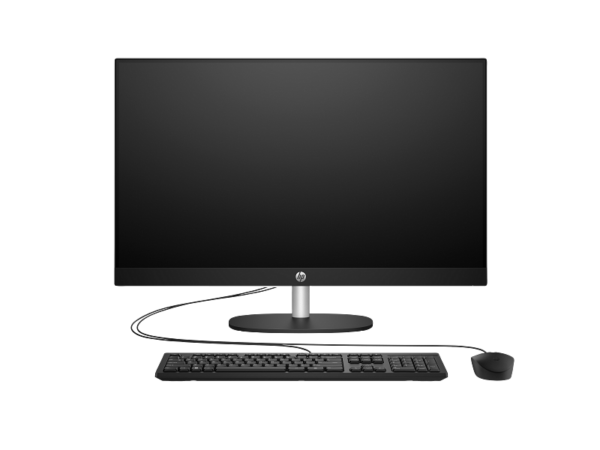
HP All-in-One 24-cr0323nh (BJ2P3EA) — 23.8-Inch FHD Touchscreen Desktop with Intel Core i5 and Iris Xe Graphics
The HP All-in-One 24-cr0323nh delivers a 13th-generation Intel Core i5 processor, Intel Iris Xe Graphics, and a 10-point Full HD touchscreen in a slim, cable-minimising all-in-one chassis. Specifically, it targets home users, students, and hybrid professionals who want a faster, more intuitive desktop experience — one where tapping, swiping, and gesturing on screen supplements traditional keyboard and mouse input. Furthermore, the BJ2P3EA ships with FreeDOS, giving buyers the freedom to install the operating system that best suits their needs, whether that is Windows 11, Ubuntu, or another distribution.
Technical Specifications
Processor
| Specification | Detail |
|---|---|
| Processor Family | 13th Generation Intel® Core™ i5 |
| Processor | Intel® Core™ i5-1334U |
| Boost Clock | Up to 4.6 GHz (Intel® Turbo Boost) |
| Cores / Threads | 10 cores / 12 threads |
| Cache | 12 MB L3 |
Memory & Storage
| Specification | Detail |
|---|---|
| Installed Memory | 8 GB DDR4-3200 MT/s (1 × 8 GB) |
| Memory Slots | 2 × SODIMM (1 available for upgrade) |
| Internal Storage | 512 GB PCIe® NVMe™ M.2 SSD |
| Expansion Slots | 2 × M.2 (1 for WLAN, 1 for storage) |
Display
| Specification | Detail |
|---|---|
| Screen Size | 23.8 inches (60.5 cm) diagonal |
| Resolution | Full HD — 1920 × 1080 |
| Panel Technology | IPS |
| Brightness | 250 nits |
| Colour Gamut | 99% sRGB |
| Viewing Angles | 178° horizontal / 178° vertical |
| Bezel | 3-sided micro-edge (anti-glare) |
| Touchscreen | Yes — 10-point multi-touch |
| Flicker-Free | Yes |
Graphics
| Specification | Detail |
|---|---|
| Graphics | Intel® Iris® Xᵉ Graphics (integrated) |
Connectivity & Ports
| Specification | Detail |
|---|---|
| USB Type-C | 1 × USB Type-C 5 Gbps |
| USB Type-A (5 Gbps) | 2 × USB Type-A 5 Gbps |
| USB Type-A (2.0) | 2 × USB 2.0 Type-A |
| Audio | 1 × 3.5 mm headphone/microphone combo |
| Video Out | 1 × HDMI-out 1.4 |
| Ethernet | 1 × RJ-45 Gigabit |
| Wireless | Wi-Fi 6 (802.11ax); Bluetooth® 5.3 |
Camera & Audio
| Specification | Detail |
|---|---|
| Camera | HP True Vision 720p HD — tilt privacy camera with temporal noise reduction |
| Microphones | Integrated dual digital array |
| Speakers | Dual 2W stereo |
Physical
| Specification | Detail |
|---|---|
| Screen-to-Body Ratio | 98.16% |
| Dimensions (W × D × H) | 54.05 × 18.62 × 40.9 cm |
| Weight | 5.27 kg |
| Colour | Shell White |
Software & Operating System
| Specification | Detail |
|---|---|
| Operating System | FreeDOS |
| Cloud Storage | 100 GB Dropbox for 3 months |
In the Box
| Item |
|---|
| HP All-in-One 24-cr0323nh PC |
| HP wired keyboard |
| HP wired mouse |
| AC power cable |
Use Cases
Home and Family Computing
The 24-cr0323nh suits a shared family desktop well, particularly when multiple users prefer different interaction styles. Specifically, younger family members who grow up navigating tablets and phones adapt to the touchscreen instantly, while traditional keyboard-and-mouse users experience no change to their workflow. Furthermore, the 10-point touch capability supports creative activities — drawing apps, map exploration, and interactive education software — that feel slow and imprecise with a mouse alone. In addition, the Core i5-1334U and Iris Xe Graphics give the machine enough power to run photo editing, light video work, and streaming simultaneously without sluggishness. As a result, the 24-cr0323nh functions as a genuinely versatile family workstation across a wide range of daily activities.
Student and Academic Use
Students who combine research, coursework, and creative projects in a single machine will appreciate the performance headroom the i5-1334U provides over an i3 configuration. In addition, Iris Xe Graphics handles tasks like diagram work in design applications, casual illustration, and smooth video playback more capably than UHD Graphics. Furthermore, the touchscreen adds a practical annotation layer for PDF textbooks and lecture slides — a use case that becomes genuinely useful once you experience marking up documents directly on the display. Moreover, the two SODIMM slots and second M.2 slot mean the machine can grow with a student’s workload over several years without requiring full replacement. Consequently, the 24-cr0323nh represents a sensible investment for multi-year student use rather than a short-cycle purchase.
Home Office and Hybrid Work
The 24-cr0323nh handles a full day of hybrid work tasks without friction. In particular, the built-in 720p privacy camera and dual digital microphones handle video conferencing on Zoom, Teams, and Google Meet without any additional accessories, while the physical camera shutter provides a quick, hardware-level privacy option during sensitive calls. Furthermore, the dual HDMI output allows a second external monitor to run alongside the built-in display, which doubles the visible workspace for users who manage multiple applications simultaneously. Additionally, Wi-Fi 6 and Gigabit Ethernet together ensure reliable network access in both home and office environments, regardless of whether a wired port is nearby. As a result, the machine adapts to hot-desking scenarios and fixed home-office setups alike.
Considerations
FreeDOS — Operating System Not Included
The BJ2P3EA ships with FreeDOS rather than Windows. Therefore, Windows applications — including Microsoft Office, Adobe software, and most commercial productivity tools — will not run until you purchase and install a Windows 11 licence separately. However, for buyers who already hold a Windows licence, a Linux distribution, or plan to install a corporate OS image, the FreeDOS configuration avoids paying for a pre-installed consumer OS you do not need. In short, budget for an OS licence if this machine goes to a user who expects Windows out of the box.
Display Brightness at 250 Nits
The built-in panel outputs 250 nits. This figure handles typical indoor use — offices, home workspaces, and rooms with moderate ambient light — comfortably. However, in a room with strong direct sunlight falling on the screen, 250 nits may appear dim. Therefore, consider your room’s lighting conditions and screen placement before purchasing, particularly if the desk sits near a south-facing window without blinds.
Touchscreen Glass Adds Slight Glare Compared to Non-Touch Panels
The touchscreen uses an in-cell touch layer over the IPS panel, which adds a thin glass surface not present on the non-touch 24-cr0315nh. Consequently, the anti-glare coating works slightly less aggressively on a touch panel than on a standard matte screen. In most indoor environments, the difference goes unnoticed. However, users who work in brightly lit rooms may notice slightly more reflection on the touch surface than on the non-touch equivalent.
Integrated Graphics — Not a Gaming Machine
Intel Iris Xe Graphics performs meaningfully better than UHD Graphics for everyday visual tasks, light photo editing, and casual 2D applications. Nevertheless, it does not suit 3D-intensive gaming, GPU-accelerated video rendering, or professional 3D design work. Therefore, users who need discrete graphics performance should consider a desktop with a dedicated GPU rather than an all-in-one with integrated graphics.
Memory Runs Single-Channel at Base Configuration
The 8 GB DDR4 ships in a single SODIMM, leaving one slot free. Consequently, memory bandwidth runs in single-channel mode, which limits performance in bandwidth-sensitive tasks compared to a dual-channel 2 × 8 GB configuration. For most home and office workloads, the difference is minimal. However, users who run memory-intensive software — large browser sessions with many tabs, video editing, or virtual machines — should consider upgrading to 16 GB in dual-channel configuration from the outset.
Frequently Asked Questions
Can I install Windows on the HP All-in-One 24-cr0323nh?
Yes. The hardware fully supports Windows 11, but the BJ2P3EA does not include a Windows licence. Therefore, you need to purchase Windows 11 Home or Pro separately and carry out the installation yourself. Alternatively, popular Linux distributions such as Ubuntu and Fedora install cleanly on this hardware and carry no additional licence cost.
Does the touchscreen work with a stylus?
The 24-cr0323nh supports standard 10-point capacitive multi-touch, which means it responds to finger input reliably. However, HP does not list a dedicated active stylus as a supported accessory for this model. Consequently, passive capacitive stylus pens — the type that mimic finger input — work on the screen, but an active pressure-sensitive stylus does not.
Can I add a second monitor to the HP 24-cr0323nh?
Yes. The rear panel includes an HDMI 1.4 output. As a result, you can connect a second external display and run it alongside the built-in touchscreen simultaneously, which effectively doubles your visible workspace for multi-window productivity tasks.
How much RAM can this machine hold, and what type?
The 24-cr0323nh supports up to 16 GB DDR4-3200 across two SODIMM slots. Consequently, you can add a second 8 GB DDR4-3200 SODIMM to reach the maximum. Furthermore, installing matched modules in both slots activates dual-channel mode, which improves memory bandwidth and delivers a noticeable responsiveness improvement over single-channel operation.
Does the HP 24-cr0323nh have built-in speakers?
Yes. The machine includes dual 2W stereo speakers. Consequently, audio for video calls, streaming, and media playback comes directly from the all-in-one without external speakers. However, for higher-quality audio, the 3.5 mm headphone/microphone combo jack accepts external speakers or headphones.
What distinguishes the 24-cr0323nh from the HP All-in-One 24-cr0315nh?
The two machines share the same chassis dimensions and 23.8-inch panel, but differ in three important ways. First, the 24-cr0323nh adds a 10-point touchscreen, while the HP All-in-One 24-cr0315nh uses a standard non-touch display. Second, the 24-cr0323nh runs an Intel Core i5-1334U with Iris Xe Graphics, whereas the 24-cr0315nh uses a Core i3-1315U with UHD Graphics. Therefore, the 24-cr0323nh delivers better graphics performance and touch interactivity at a higher price point.
Related Products
- HP All-in-One 24-cr0315nh — Core i3 non-touch variant at a lower price point, with the same chassis and 99% sRGB display
- HP ProOne 240 G10 All-in-One — business-tier i5 all-in-one with 5MP camera, EPEAT Gold, and enterprise management features
- HP E27 G5 FHD Monitor — 27-inch FHD external display with 4-way stand and USB hub for extending the desktop workspace
- HP Series 5 527da FHD Monitor — 27-inch FHD standalone display with built-in speakers for a secondary screen position
Reviews
There are no reviews yet.