
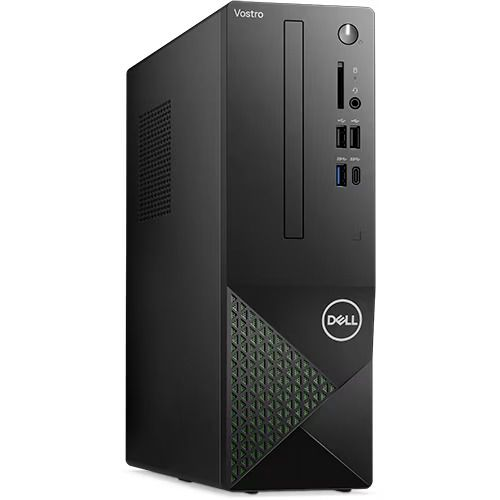
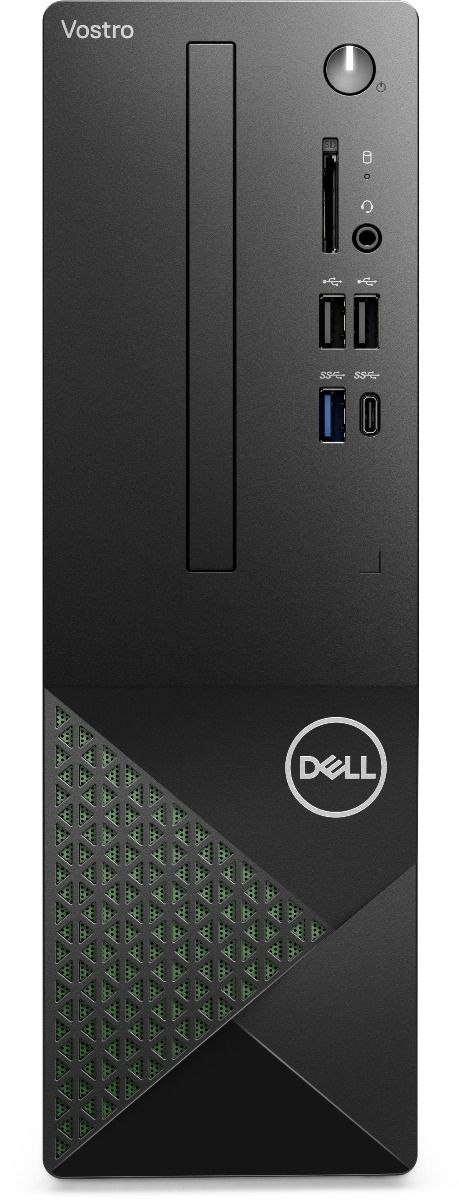

Dell Vostro 3030 MT (Core i5-14400) — Slim 14th Gen Business Desktop with Ubuntu Linux
The Dell Vostro 3030 MT with Intel Core i5-14400 is a compact mini tower desktop built for small and medium-sized businesses that need dependable 14th Generation processing power in a space-saving form factor. The 7.8L chassis fits on or below a desk, while the 14th Gen Intel Core i5-14400 delivers 20MB of cache across 10 cores and 16 threads with turbo boost reaching 4.70GHz at a 65W TDP — all in a Linux-native Ubuntu configuration. Office teams, developers, and IT departments deploying open-source workstations across multiple desks will find this machine a well-rounded, cost-effective choice.
Technical Specifications
Processor
| Specification | Detail |
|---|---|
| Processor | Intel Core i5-14400 |
| Generation | 14th Generation (Raptor Lake Refresh) |
| Base Clock (P-Core) | 2.5GHz |
| Max Turbo (P-Core) | Up to 4.7GHz |
| Base Clock (E-Core) | 1.8GHz |
| Max Turbo (E-Core) | Up to 3.5GHz |
| Cores / Threads | 10 cores (6P + 4E) / 16 threads |
| Cache | 20MB |
| TDP | 65W |
Chipset
| Specification | Detail |
|---|---|
| Chipset | Intel B660 |
Memory
| Specification | Detail |
|---|---|
| RAM (this config) | 8GB DDR5 (1 × 8GB SO-DIMM) |
| Memory Speed | 4800 MT/s |
| Channel | Single-channel (upgradeable to dual) |
| Memory Slots | 2 slots (1 free) |
| Max Supported RAM | 64GB DDR5 |
Storage
| Specification | Detail |
|---|---|
| SSD | 512GB M.2 NVMe PCIe Gen 4 SSD |
| Form Factor | M.2 2230/2280 |
| Additional Storage Bay | 1 × SATA 3.0 slot (3.5-inch HDD) |
| Optical Drive | Not included |
Graphics
| Specification | Detail |
|---|---|
| GPU | Intel UHD Graphics 730 (integrated) |
| Discrete GPU Support | Yes — via full-height Gen3 PCIe x16 slot |
| Max HDMI Resolution | 1920 × 1200 (HDMI 1.4b) |
| DisplayPort Output | DisplayPort 1.4 |
Front Ports
| Port | Specification |
|---|---|
| USB 3.2 Gen 1 Type-A | 1 × (5 Gbps) |
| USB 3.2 Gen 1 Type-C | 1 × (5 Gbps) |
| USB 2.0 | 2 × (480 Mbps) |
| Audio | 1 × universal headset jack |
Rear Ports
| Port | Specification |
|---|---|
| USB 3.2 Gen 1 Type-A | 2 × (5 Gbps) |
| USB 2.0 | 2 × with Power On/Wake support |
| HDMI | 1 × HDMI 1.4b (max 1920 × 1200) |
| DisplayPort | 1 × DisplayPort 1.4 |
| Ethernet | 1 × RJ-45 Gigabit (1 Gbps) |
| Audio Line-Out | 1 × 3.5mm |
Internal Expansion Slots
| Slot | Detail |
|---|---|
| PCIe x16 | 1 × full-height Gen3 PCIe x16 (discrete GPU) |
| PCIe x1 | 2 × full-height Gen3 PCIe x1 |
| M.2 SSD | 1 × M.2 2230/2280 NVMe slot |
| M.2 Wi-Fi | 1 × M.2 2230 slot (Wi-Fi/Bluetooth combo) |
| SATA HDD | 1 × SATA 3.0 (3.5-inch drive) |
| Security | 1 × Kensington lock slot |
Networking
| Specification | Detail |
|---|---|
| Ethernet | Integrated Gigabit LAN (10/100/1000) |
| Wireless | Realtek RTL8852BE, Wi-Fi 6 (802.11ax), 2×2, MU-MIMO |
| Bluetooth | Bluetooth 5.3 |
Audio
| Specification | Detail |
|---|---|
| Audio | High Definition Audio |
| Front Output | 1 × universal headset jack |
| Rear Output | 1 × audio line-out |
| Speakers | None included |
Physical
| Specification | Detail |
|---|---|
| Form Factor | Mini Tower (MT) |
| Chassis Volume | 7.8 litres |
| Height | 290.00 mm (11.42 in.) |
| Width | 92.60 mm (3.65 in.) |
| Depth | 292.80 mm (11.53 in.) |
| Starting Weight | approx. 5.32 kg (11.73 lb) |
| Colour | Black |
Power
| Specification | Detail |
|---|---|
| Power Supply | 180W internal PSU |
| Input Voltage | 100–240V AC, 50/60Hz |
Operating System
| Specification | Detail |
|---|---|
| OS (this config) | Ubuntu Linux |
| Other Supported OS | Windows 11 Pro, Windows 11 Home, FreeDOS |
Security
| Feature | Detail |
|---|---|
| TPM | TPM 2.0 |
| Drive Wipe | Secure Erase via BIOS |
| Physical | Kensington lock slot, padlock loop |
In the Box
| Item | Detail |
|---|---|
| Keyboard | Dell Wired Keyboard KB216 |
| Mouse | Dell USB Optical Mouse MS116 |
| Power Cord | Included |
| Warranty | 3-Year ProSupport with Next Business Day Onsite |
Certifications & Compliance
- ENERGY STAR certified
- EPEAT compliant
- RoHS compliant
Use Cases & Applications
Everyday Business Workstations The 7.8L chassis fits on or below a desk, keeping workspace clear while the 10-core i5-14400 handles email, spreadsheets, ERP platforms, video conferencing, and document workflows simultaneously. The 180W PSU keeps energy consumption low across an office day.
Software Development on Linux Ubuntu pre-installation makes the Vostro 3030 MT a capable development machine from the first boot. Developers can run Docker containers, manage Git repositories, and work across multiple terminal sessions without hitting processor limits. The free SO-DIMM slot supports a quick RAM upgrade for memory-heavy workloads.
IT Fleet Deployments TPM 2.0, a Kensington lock slot, and a padlock loop give IT administrators the security controls they need across a multi-unit deployment. The Ubuntu environment also supports enterprise management tools for centralised software management and remote administration.
Dual-Monitor Productivity Setups The rear HDMI and DisplayPort outputs let users connect two monitors for side-by-side workflows — useful for analysts comparing data, developers referencing documentation, and customer-facing staff managing multiple applications at once.
Education & Training Environments The open-source Ubuntu configuration suits universities, coding bootcamps, and technical training centres running Linux-based curricula. No per-seat OS licensing costs make bulk deployments more budget-friendly compared to Windows configurations.
How Does the i5-14400 Compare to the i7-12700 Configuration?
Both processors sit in the same Vostro 3030 MT chassis, but they differ in generation and thread count. The i7-12700 (12th Gen) offers 12 cores and 20 threads with up to 4.90GHz turbo, making it stronger for heavily threaded workloads like large compilations or parallel processing. The i5-14400 (14th Gen) uses a newer Raptor Lake Refresh architecture across 10 cores and 16 threads with up to 4.70GHz turbo — a newer platform with improved efficiency at a lower cost point. For standard office and development tasks, both handle daily workloads comfortably. Teams running heavy parallel jobs should consider the i7-12700 configuration.
Frequently Asked Questions
Does the Dell Vostro 3030 MT (i5-14400) support Windows? Yes. While this model ships with Ubuntu Linux, the hardware also supports Windows 11 Pro, Windows 11 Home, and FreeDOS. Users can install a licensed copy of Windows independently.
Can you upgrade the RAM later? Yes. The 8GB base configuration runs as a single DDR5 4800 MT/s module, leaving one slot free for expansion up to 64GB DDR5. Adding a matching module enables dual-channel mode for a memory bandwidth improvement.
Does it include Wi-Fi out of the box? Yes. The machine includes a Realtek RTL8852BE Wi-Fi 6 card with Bluetooth 5.3 — no USB adapter needed.
Can you add a dedicated GPU? Yes. The full-height Gen3 PCIe x16 slot accepts a discrete graphics card. The 180W PSU limits compatible card options, so check GPU power requirements before purchasing.
Does it support dual monitors? Yes. The rear panel includes one HDMI 1.4b and one DisplayPort 1.4 output, supporting two displays simultaneously. Note that the HDMI port caps at 1920 × 1200 resolution.
Related Products
For a full comparison of Ubuntu-ready business desktops at different price points, read our guide on the Dell Vostro 3030 MT for Linux business workstations.
Reviews
There are no reviews yet.