
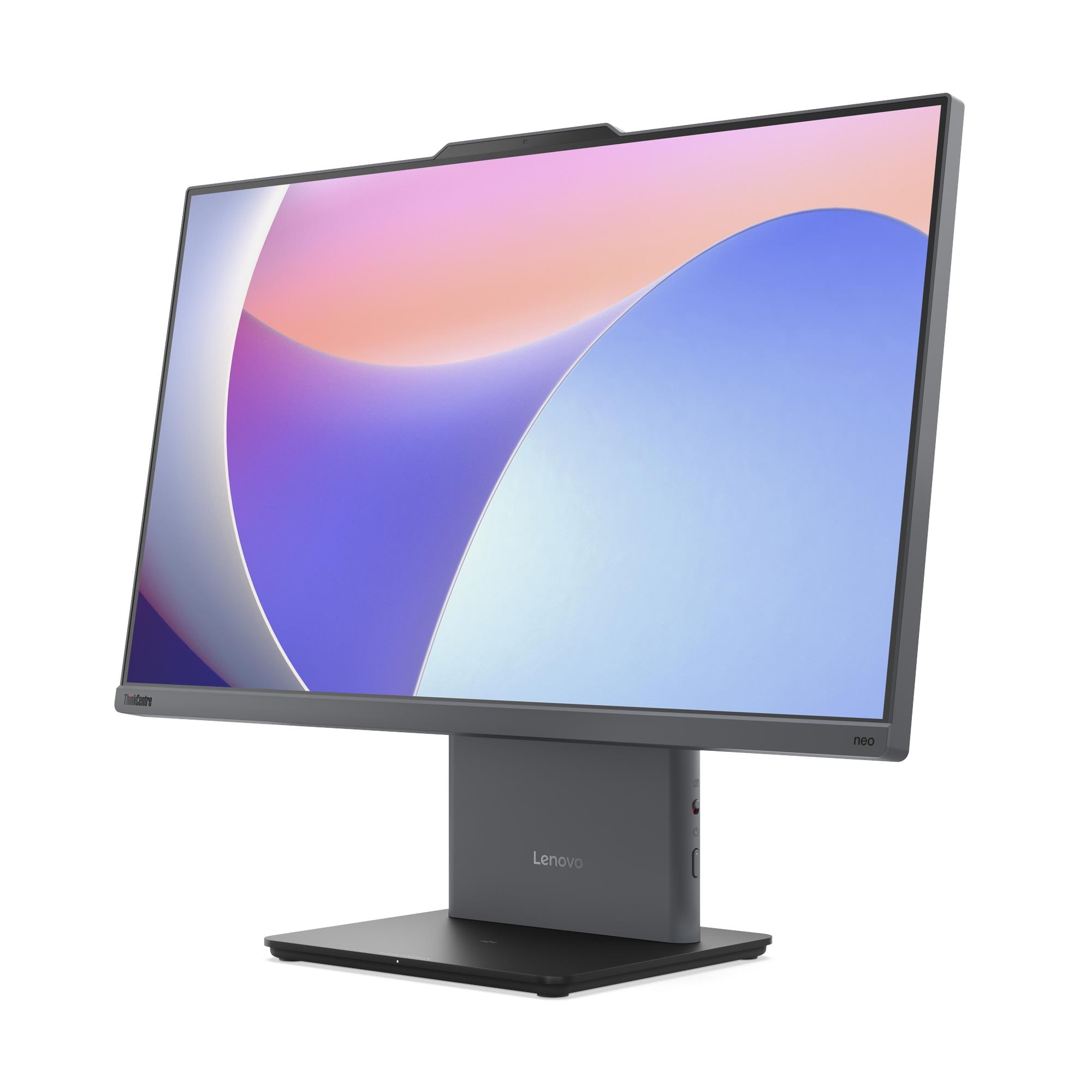
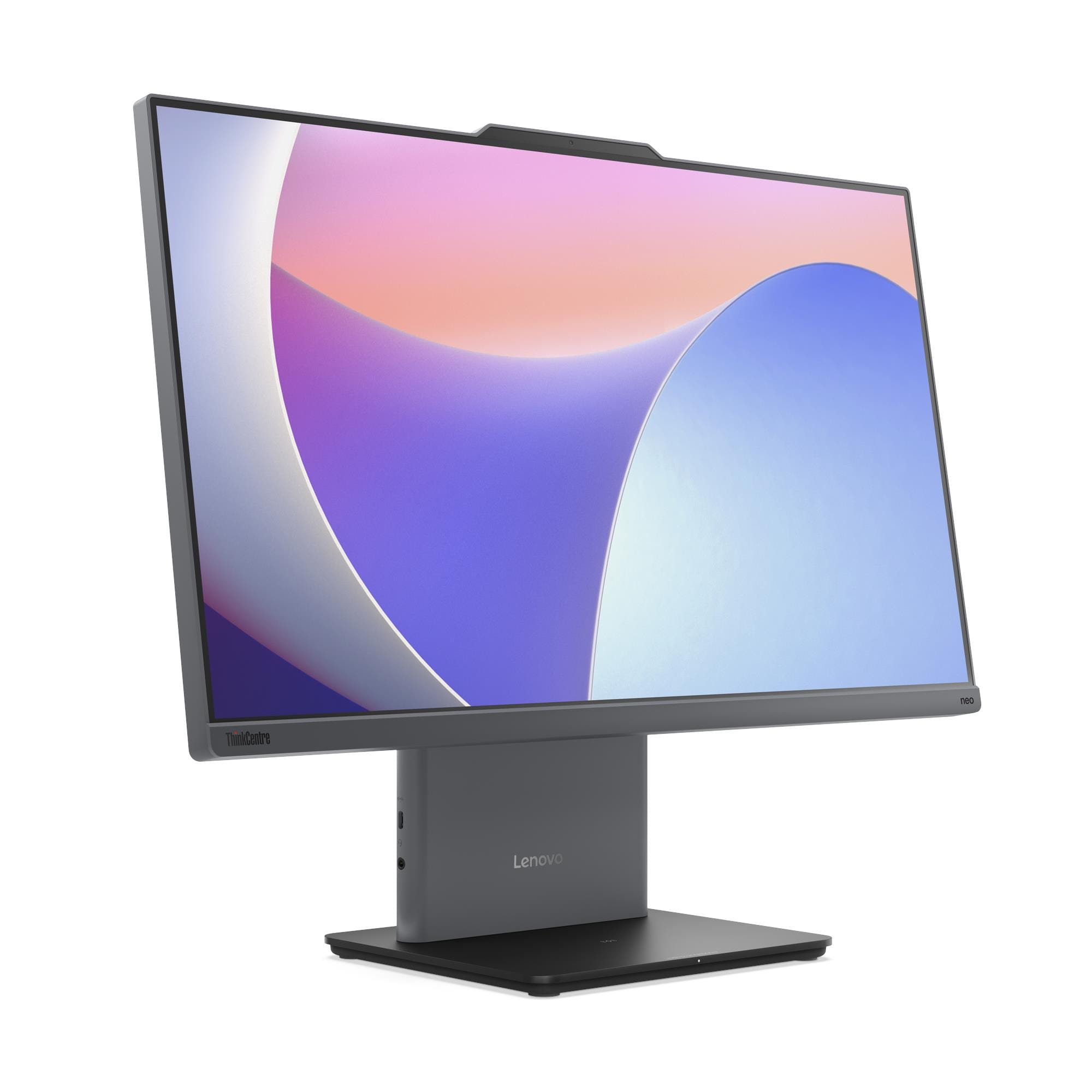
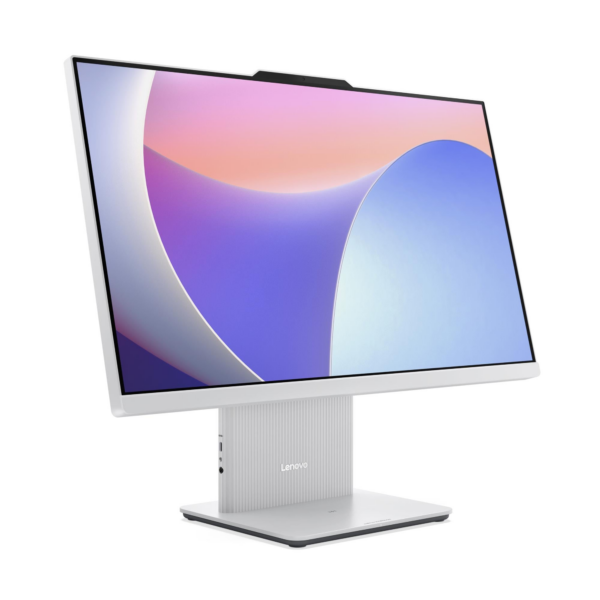
Lenovo ThinkCentre neo 50a 24 Gen 5 All-in-One Desktop — Intel Core 7 240H, 8GB DDR5, 512GB SSD, 23.8″ FHD, No OS — Model 12SC009EUM
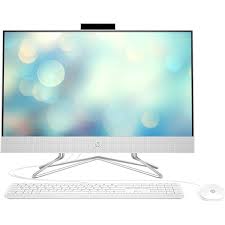
The Lenovo ThinkCentre neo 50a 24 Gen 5 is a 23.8-inch All-in-One desktop that delivers high-performance business computing in a compact Luna Grey chassis — combining a 10-core Intel Core 7 240H Series 2 processor, a 100Hz FHD IPS display, HARMAN-tuned stereo speakers, and a 5MP camera into a single desk unit. Specifically, the Core 7 240H reaches 5.2GHz peak P-core frequency — the highest single-thread ceiling in the neo 50a Gen 5 AIO range — making this the most capable processor option available in the 24-inch platform. As a result, this AIO suits demanding business users, hybrid workers, creative professionals, and IT teams who need a powerful, space-efficient workstation that ships without a preloaded OS for image-controlled deployment.
Technical Specifications
Display
| Specification | Detail |
|---|---|
| Screen Size | 23.8 inches |
| Resolution | 1920×1080 (Full HD) |
| Panel Type | IPS (In-Plane Switching) |
| Refresh Rate | 100Hz |
| Brightness | 250 nits |
| Contrast Ratio | 1300:1 |
| Colour Gamut | 99% sRGB |
| Viewing Angles | 89° / 89° / 89° / 89° (L/R/U/D) |
| Response Time | 14ms |
| Surface Treatment | Anti-glare |
| Aspect Ratio | 16:9 |
| Touchscreen | Non-touch (this configuration) / Optional 10-point multi-touch |
| Display Features | Borderless design, Low Blue Light, Flicker Free |
Processor
| Specification | Detail |
|---|---|
| Processor | Intel® Core 7 240H (Series 2) |
| Cores / Threads | 10 cores (6 P-core + 4 E-core) / 16 threads |
| Base Frequency | P-core 2.5GHz / E-core 1.8GHz |
| Max Frequency | P-core 5.2GHz / E-core 4.0GHz |
| Cache | 24MB Intel® Smart Cache |
| Platform | Intel® SoC (System on Chip) |
Memory
| Specification | Detail |
|---|---|
| Installed RAM | 8GB DDR5-5200 |
| Memory Slots | 2× DDR5 SO-DIMM, dual-channel capable |
| Dual-Channel Status | Single DIMM installed — dual-channel inactive |
| Maximum Memory | Up to 32GB DDR5-5200 |
Storage
| Specification | Detail |
|---|---|
| Installed SSD | 512GB M.2 2280 PCIe® NVMe®, PCIe® 4.0 x4 |
| Maximum Storage | Up to 1TB M.2 2280 SSD (single drive only) |
| Optical Drive | None |
| Card Reader | None |
Graphics
| Specification | Detail |
|---|---|
| Integrated Graphics | Intel® Graphics (Series 2 — dedicated GPU architecture) |
| Max External Resolution | 4096×2160 @ 60Hz (via HDMI 2.1 out) |
| DirectX Support | DirectX® 12.1 |
| Monitor Support | Native 23.8″ display + 1 external monitor via HDMI out |
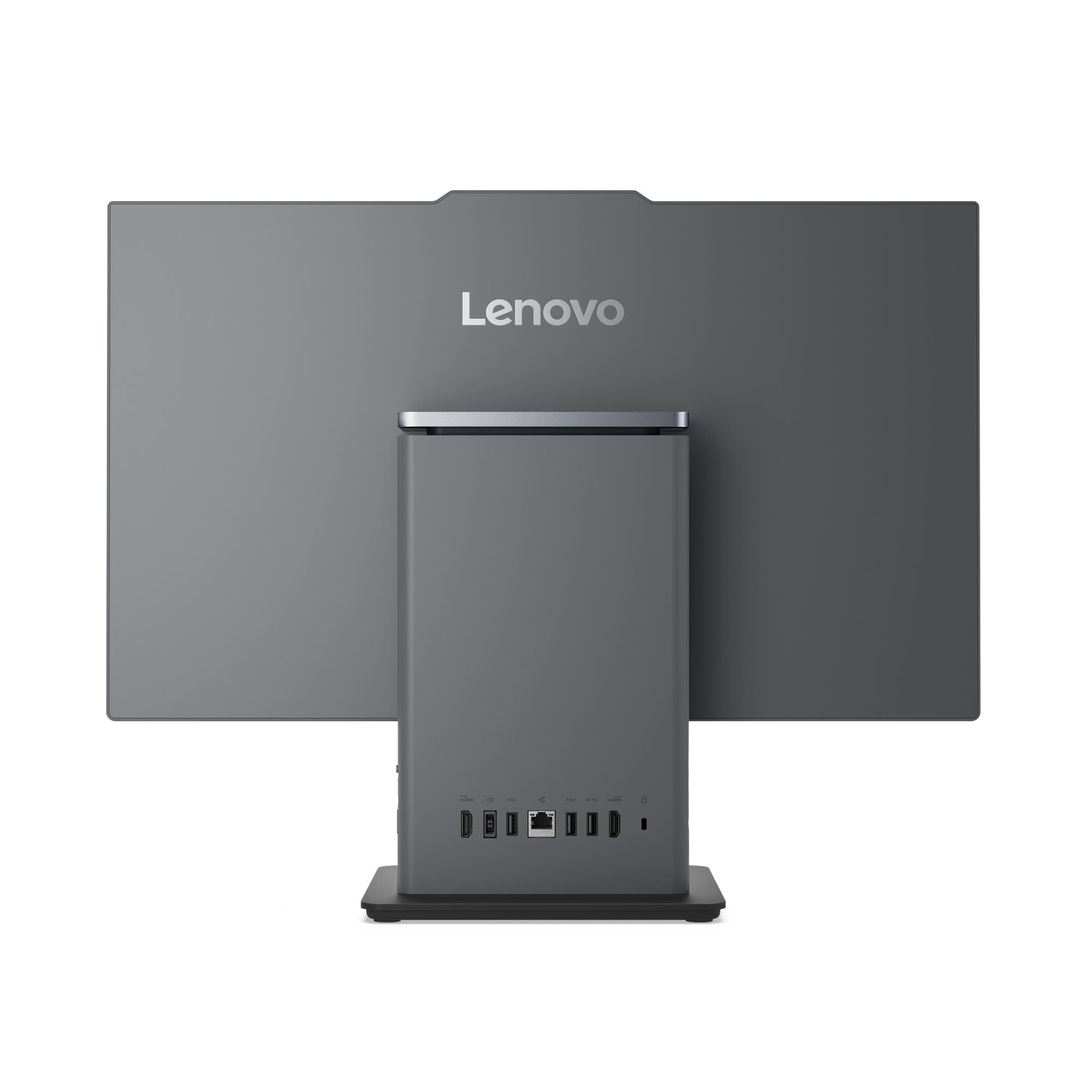
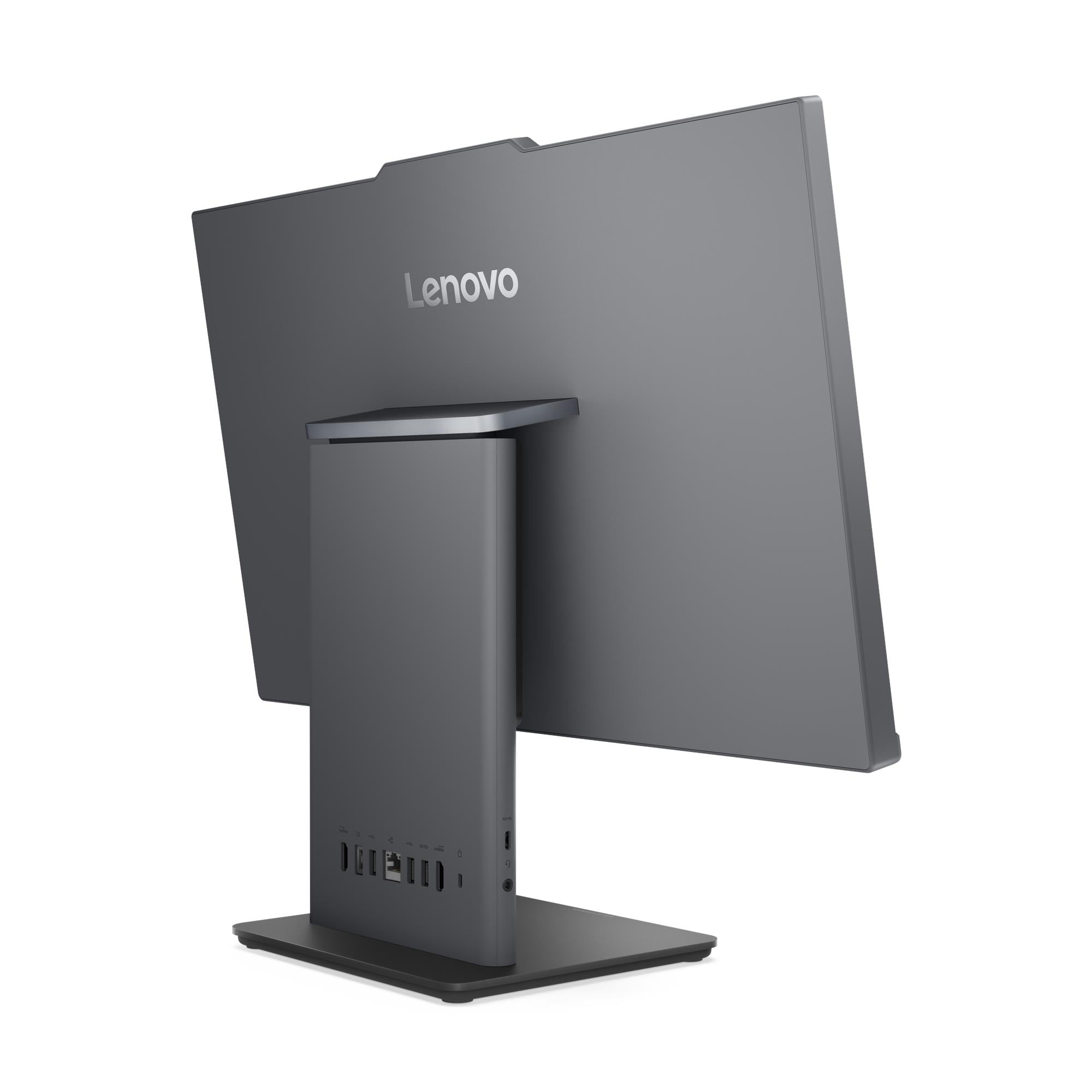
Rear Ports
| Port | Detail |
|---|---|
| USB-A (10Gbps) | 1× USB-A (USB 10Gbps / USB 3.2 Gen 2) |
| USB-A (USB 2.0) | 2× USB-A (Hi-Speed USB 2.0) |
| HDMI In | 1× HDMI® 1.4 input |
| HDMI Out | 1× HDMI® 2.1 TMDS output |
| Ethernet | 1× Gigabit Ethernet RJ-45, Realtek® RTL8111H |
| Power | 1× power connector |
Left-Side Ports
| Port | Detail |
|---|---|
| USB-C | 1× USB-C (USB 10Gbps / USB 3.2 Gen 2), data transfer and 15W charging |
| Audio | 1× headphone/microphone combo jack (3.5mm) |
Wireless Connectivity
| Specification | Detail |
|---|---|
| Wi-Fi Options | Realtek Wi-Fi 6 RTL8852BE + Bluetooth 5.2 / Intel Wi-Fi 6 AX201 + Bluetooth 5.2 |
| WLAN Card Type | M.2 card |
| Ethernet | Gigabit (1GbE) onboard |
Camera and Audio
| Specification | Detail |
|---|---|
| Camera | 5.0-megapixel (IR variant available for Windows Hello) |
| Privacy Shutter | Physical camera shutter latch |
| Microphone | Dual-microphone array |
| Speakers | Stereo 3W×2, Audio by HARMAN |
| Audio Chip | Realtek® ALC233-CG HD Audio codec |
Security
| Specification | Detail |
|---|---|
| Security Chip | Firmware TPM 2.0, integrated in SoC |
| Physical Lock | Kensington® Security Slot™ 3×7mm (standard on models manufactured from 10 February 2025) |
| Chassis Intrusion | None |
| BIOS Security | Administrator password, power-on password, Secure Boot, Self-Healing BIOS, Intel BIOS Guard, Boot Sequence Control |
Design & Physical
| Specification | Detail |
|---|---|
| Form Factor | All-in-One, 23.8 inches |
| Colour | Luna Grey |
| Dimensions (W×D×H) | 540 × 192 × 431 mm |
| Weight | Approx. 6.0 kg |
| Stand | Monitor stand, tilt -5° to +15° |
| VESA Mounting | None |
| Optional Accessory | Wireless charger 15W (optional) |
| Chassis Material | 65% PCC ABS bezel |
Power Supply
| Specification | Detail |
|---|---|
| Power Supply Options | 90W adapter (89% efficiency) / 135W adapter (90% efficiency) |
| Voltage | Autosensing |
Operating System
| Specification | Detail |
|---|---|
| Installed OS | No preloaded operating system |
| Compatible OS | Windows 11 Pro, Windows 11 Home, Windows 11 Home Single Language, Ubuntu Linux |
Certifications
| Category | Certifications |
|---|---|
| Environmental | ENERGY STAR® 8.0 (optional), EPEAT™ Gold (optional), ErP Lot 3/7, GREENGUARD®, RoHS, WEEE, REACH |
| Display Eye Care | TÜV Rheinland® Flicker Free, TÜV Rheinland® Low Blue Light |
| Noise | TÜV Rheinland® Ultra Low Noise |
| Sustainability | 65% PCC ABS bezel, 95% PCC recycled keyboard/mouse plastic, 30% Ocean Bound Plastic bag, FSC-certified paper packaging |
Warranty
1-year courier/carry-in or 1-year limited onsite service (varies by model configuration)
Use Cases
High-Performance Business AIO Deployments
The Core 7 240H’s 5.2GHz P-core peak and 10-core hybrid architecture make the neo 50a 24 Gen 5 the most capable processor configuration available in the 24-inch AIO platform — suitable for multi-application ERP workloads, data analysis, intensive video conferencing, and content-heavy productivity environments. In particular, the dedicated Intel Graphics architecture on the Series 2 processor handles AI-accelerated and graphics-intensive tasks more effectively than the UHD Graphics found in the i5 and i7 13th-generation variants. Consequently, this configuration suits business users who push their workstation harder than a standard office productivity configuration typically requires.
Hot-Desking and Shared Professional Workspaces
The single-cable AIO design, HARMAN audio, 5MP camera, and dual-microphone array deliver a complete professional workstation at each desk without peripheral clutter. Furthermore, the Kensington Security Slot (on units manufactured from February 2025) enables physical cable locking — making the neo 50a 24 Gen 5 appropriate for shared office environments where the IdeaCentre AIO 24IRH9 would not meet physical security requirements. Additionally, the USB-C port’s 15W charging output means users charge their phones or tablets directly from the desk unit without a separate power adapter.
IT-Managed OS-Agnostic Deployments
The 12SC009EUM ships bare-metal with no preloaded OS, giving IT teams full control over image deployment from first boot. Specifically, the machine supports Windows 11 Pro, Windows 11 Home, Windows 11 Home Single Language, and Ubuntu Linux — covering the full range of enterprise and open-source deployment environments. As a result, this configuration suits organisations maintaining validated golden images that need a clean, unencumbered target machine rather than a retail-configured unit.
Video Conferencing and Communication-Heavy Roles
The 5MP camera with optional IR for Windows Hello, dual-microphone array, and HARMAN-tuned 3W×2 speakers create a video conferencing experience considerably above what monitor-mounted webcam and headset combinations typically deliver. Moreover, the 100Hz FHD IPS display reduces on-screen flicker during scrolling and presentation delivery — a practical improvement for users who spend the majority of their working day on calls and screen-based communication.
Dual-Source Desk Configurations
The rear HDMI 1.4 input allows a second device — such as a visiting laptop, a thin client, or a secondary PC — to use the neo 50a 24 Gen 5’s integrated 23.8-inch display as an external monitor. Additionally, the HDMI 2.1 output drives a second external monitor for users who need a two-screen working layout. Therefore, one desk unit supports both a fixed primary workstation and a flexible secondary display arrangement simultaneously.
Considerations
Memory at 8GB — Single DIMM, Dual-Channel Inactive
This configuration ships 8GB DDR5-5200 in a single SO-DIMM, leaving the second slot empty and dual-channel memory operation inactive. Consequently, users running concurrent professional applications — ERP platforms, large browser sessions, video conferencing alongside other workloads — will see a measurable improvement from adding a matched second DIMM to activate dual-channel mode. The platform supports up to 32GB DDR5-5200 total across both slots.
Intel Graphics Series 2 — Not Intel UHD Graphics
The Core 7 240H integrates Intel Graphics (Series 2) rather than the Intel UHD Graphics found in the 13th-generation i5 and i7 variants on the same platform. Consequently, driver compatibility, software certification, and GPU feature support may differ from the UHD Graphics architecture that enterprise software vendors more commonly certify against. IT teams deploying GPU-dependent business applications should verify Intel Graphics Series 2 compatibility before rolling out this configuration at scale.
Single M.2 SSD — No Secondary Storage Expansion
The chassis accepts one M.2 2280 SSD with a maximum capacity of 1TB. Therefore, users who accumulate large local data volumes — project archives, media assets, or application installations — beyond 1TB must use external USB storage or network solutions. Additionally, no card reader ships on this model, so transferring files from SD or memory cards requires a separate USB card reader.
Firmware TPM 2.0 — Not a Discrete Module
The security chip uses firmware TPM 2.0 integrated into the SoC rather than a discrete hardware TPM. Consequently, regulated environments mandating a discrete TPM or FIPS 140-2 TPM certification should evaluate the ThinkCentre M70t Gen 5 or M70s Gen 5 tower, both of which carry discrete TPM 2.0 certified to FIPS 140-2. For standard corporate security requirements, firmware TPM 2.0 functions adequately.
No VESA Mount Support
The neo 50a 24 Gen 5 uses its own tilt-adjustable monitor stand exclusively — no VESA wall or arm mount option exists on any configuration. Therefore, IT teams planning wall-mounted or arm-mounted AIO deployments must confirm this limitation before specifying the 12SC009EUM. The stand adjusts between -5° and +15° tilt only, with no height or swivel range.
Kensington Security Slot — Manufacturing Date Dependent
The Kensington® Security Slot is standard only on units manufactured on or after 10 February 2025. Consequently, IT teams purchasing refurbished or older-stock units should verify the manufacturing date before assuming physical lock compatibility, as units manufactured before this date may not carry the slot.
Frequently Asked Questions
How Does the Intel Core 7 240H Differ from the Core i7-13620H?
The Core 7 240H belongs to Intel’s Series 2 (Meteor Lake-H) architecture, while the Core i7-13620H belongs to the 13th-generation Raptor Lake-H family. Both processors carry 10 cores and 16 threads. However, the Core 7 240H reaches a higher peak P-core frequency of 5.2GHz versus the i7-13620H’s 4.9GHz, and integrates a dedicated Intel Graphics architecture rather than Intel UHD Graphics — delivering better AI acceleration, media processing, and graphics workload performance. Consequently, the Core 7 240H configuration represents the highest-performance AIO option in the neo 50a 24 Gen 5 range.
What Is the Difference Between the neo 50a 24 Gen 5 and the neo 50a 27 Gen 5?
Both machines share the same processor options, memory platform (up to 32GB DDR5-5200), PCIe 4.0 NVMe storage, port layout, HARMAN audio, 5MP camera, and certification suite. However, the neo 50a 27 Gen 5 delivers a larger 27-inch display at 300 nits brightness compared to the neo 50a 24 Gen 5’s 23.8-inch panel at 250 nits. In contrast, the neo 50a 24 Gen 5 occupies a smaller physical footprint — 540mm wide versus 611.72mm — and weighs approximately 6.0 kg versus 7.1 kg, making it the better choice for desk-constrained environments.
Can I Upgrade the RAM After Purchase?
Yes. The second SO-DIMM slot accepts an additional DDR5-5200 module, and adding a matched DIMM activates dual-channel memory operation — which increases memory bandwidth measurably. The platform ceiling is 32GB DDR5-5200 total, giving meaningful upgrade headroom beyond the installed 8GB.
Does the USB-C Port Support Charging?
Yes. The left-side USB-C port (USB 10Gbps / USB 3.2 Gen 2) delivers both data transfer at 10Gbps and 15W device charging simultaneously. This differentiates the neo 50a 24 Gen 5 from the IdeaCentre AIO 24IRH9, whose USB-C port supports data transfer only.
Can I Use the Screen as an External Monitor for a Laptop?
Yes. The rear HDMI 1.4 input accepts a video signal from a second device, allowing it to display on the neo 50a 24 Gen 5’s integrated 23.8-inch screen. However, the HDMI input runs at HDMI 1.4 standard — maximum supported resolution and refresh rate over the input depends on the source device’s own HDMI output capability.
Does the neo 50a 24 Gen 5 Support Windows Hello?
Windows Hello facial recognition requires the 5MP IR camera variant. Buyers should confirm whether the IR camera ships in the 12SC009EUM configuration at point of order, as a standard (non-IR) 5MP camera variant also exists on this platform. No fingerprint reader is available on the neo 50a 24 Gen 5.
Does This Machine Support Wi-Fi?
Wi-Fi is optional on this platform. Available configurations include Realtek Wi-Fi 6 RTL8852BE (Bluetooth 5.2) and Intel Wi-Fi 6 AX201 (Bluetooth 5.2). Buyers should confirm the wireless card in the 12SC009EUM configuration at point of order. Wired Gigabit Ethernet via Realtek RTL8111H is confirmed as the standard onboard network connection.
For compatible monitors, memory upgrade kits, and Lenovo AIO accessories, see our Lenovo ThinkCentre desktop accessories.
For full technical documentation and configuration options, visit the Lenovo ThinkCentre neo 50a 24 Gen 5 official product page.
Reviews
There are no reviews yet.