
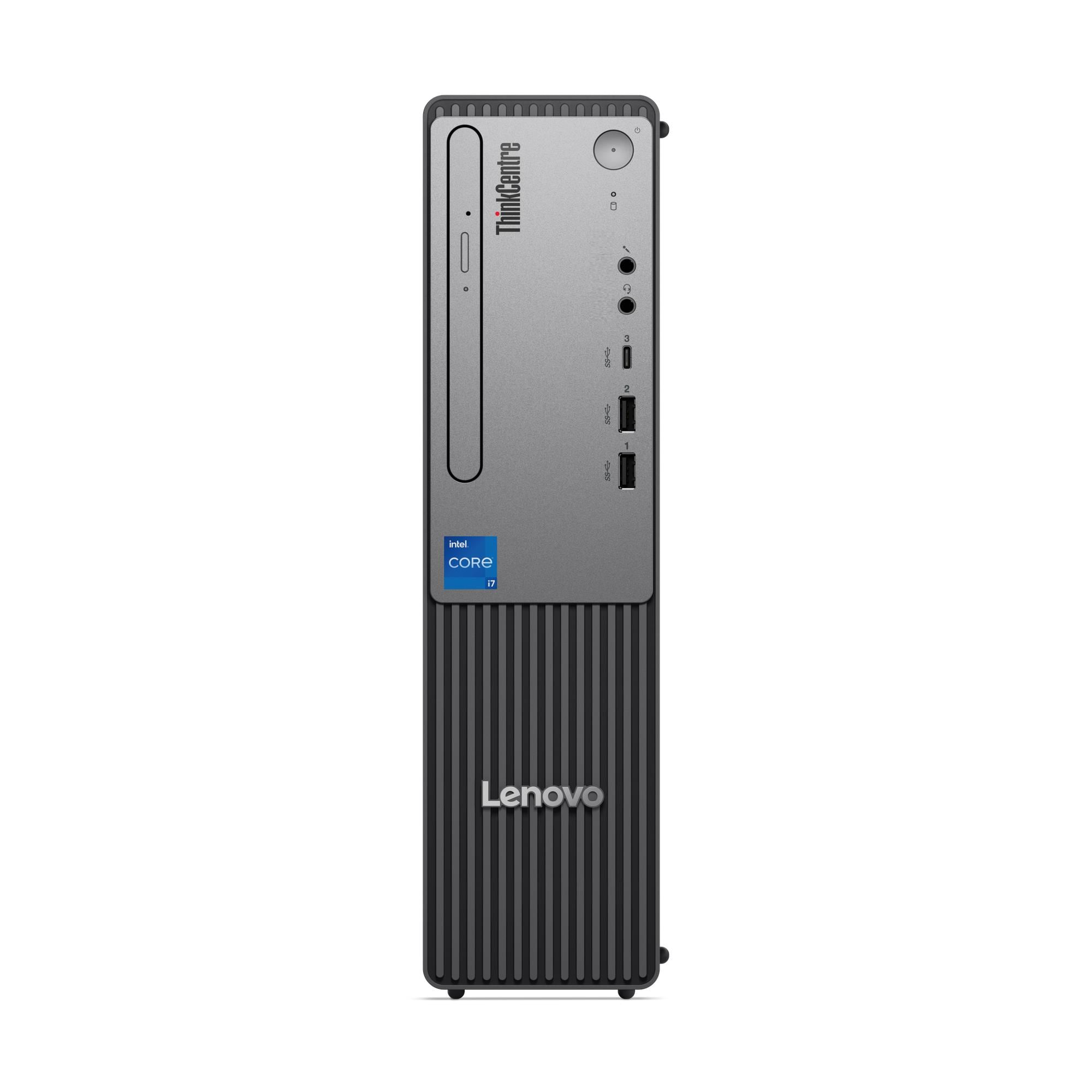
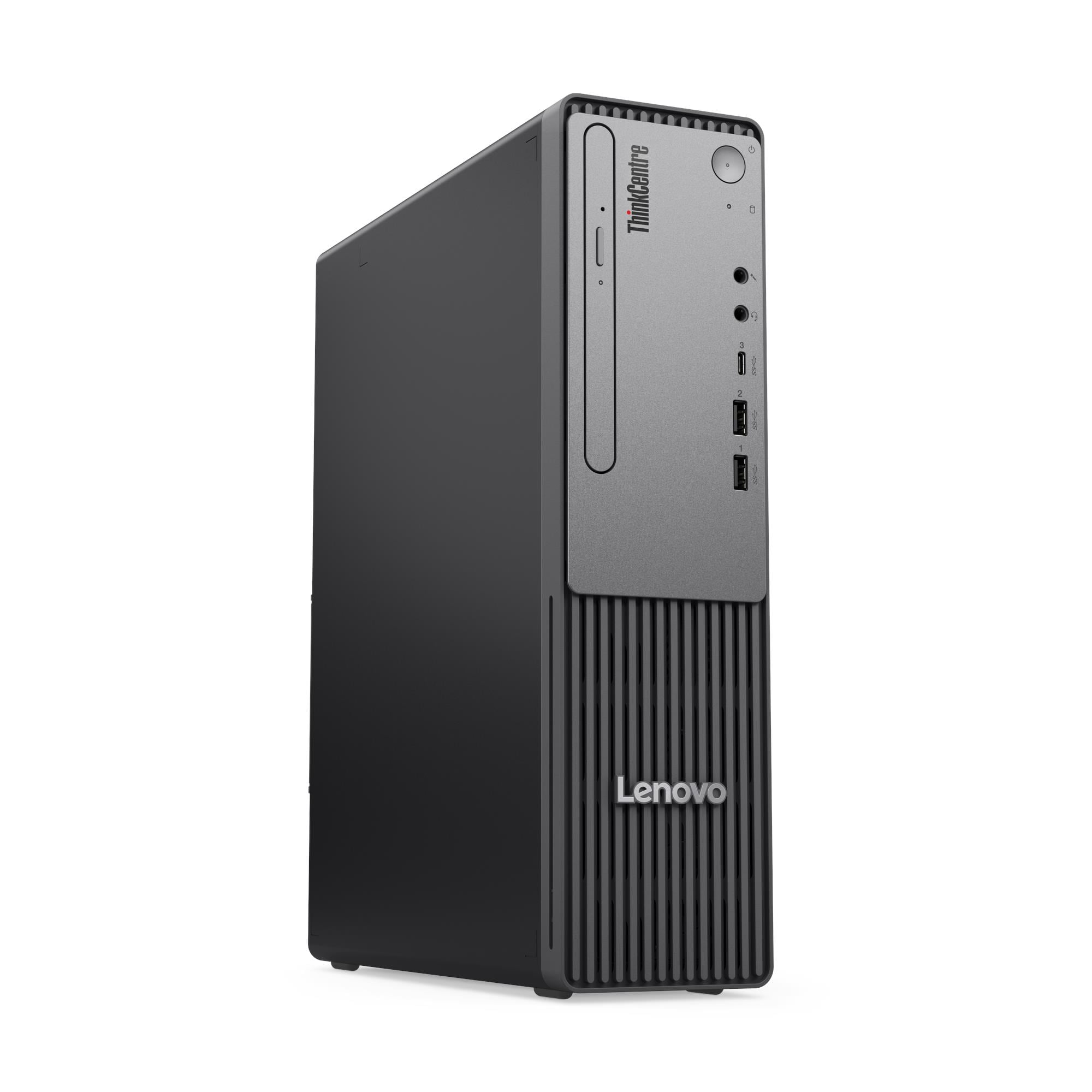
Lenovo ThinkCentre neo 30s Gen 5 SFF Desktop — Intel Core i7-13620H, 16GB DDR5, 512GB SSD, No OS — Model 13DK002MUM
The Lenovo ThinkCentre neo 30s Gen 5 is a Small Form Factor business desktop that brings laptop-grade processing efficiency to a fixed-desk environment. Specifically, it houses a 10-core Intel Core i7-13620H mobile processor — the same silicon used in premium business laptops — within an 8.2-litre SFF chassis, so it delivers strong multi-core performance at notably lower power consumption than traditional desktop processors. As a result, this machine suits small business owners, professional home office users, and IT teams seeking a quiet, compact, energy-efficient workstation without sacrificing processing capability.
Technical Specifications
Processor
| Specification | Detail |
|---|---|
| Processor | Intel® Core™ i7-13620H |
| Cores / Threads | 10 cores (6 P-core + 4 E-core) / 16 threads |
| Max Frequency | P-core 4.9GHz / E-core 3.6GHz |
| Cache | 24MB Intel® Smart Cache |
| Platform | Intel® SoC (System on Chip) |
| Memory Support | DDR5-5200 |
Memory
| Specification | Detail |
|---|---|
| Installed RAM | 16GB DDR5-5200 |
| Memory Slots | 2× DDR5 SO-DIMM, dual-channel capable |
| Maximum Memory | Up to 64GB DDR5-5200 |
| Channel Status | Dual-channel active at 16GB (2× DIMM) |
Storage
| Specification | Detail |
|---|---|
| Installed SSD | 512GB M.2 2280 PCIe® NVMe®, PCIe® 4.0 x4 |
| Second M.2 Slot | Available for user-installed SSD (up to 1TB, PCIe 4.0 x4 or PCIe 3.0 x4) |
| Total M.2 Slots | 3× M.2 (1× WLAN, 2× SSD) |
| Max Storage | Up to 2× M.2 SSDs, 1TB each |
Graphics
| Specification | Detail |
|---|---|
| Integrated Graphics | Intel® UHD Graphics (13th Gen) |
| Max Resolution (HDMI) | 3840×2160 @ 60Hz |
| Max Resolution (VGA) | 1920×1200 @ 60Hz |
| API Support | DirectX® 12, OpenGL 4.6, OpenCL 3.0 |
| Monitor Support | Up to 2 independent displays via onboard HDMI + VGA |
| Discrete Graphics Option | Intel® Arc™ A310 LP, 4GB GDDR6 (optional, low-profile) |
Front Ports
| Port | Detail |
|---|---|
| USB-C | 1× USB-C (USB 5Gbps / USB 3.2 Gen 1), 15W charging |
| USB-A | 2× USB-A (USB 5Gbps / USB 3.2 Gen 1) |
| Audio | 1× headphone/microphone combo jack (3.5mm) |
| Microphone | 1× microphone jack (3.5mm) |
Rear Ports
| Port | Detail |
|---|---|
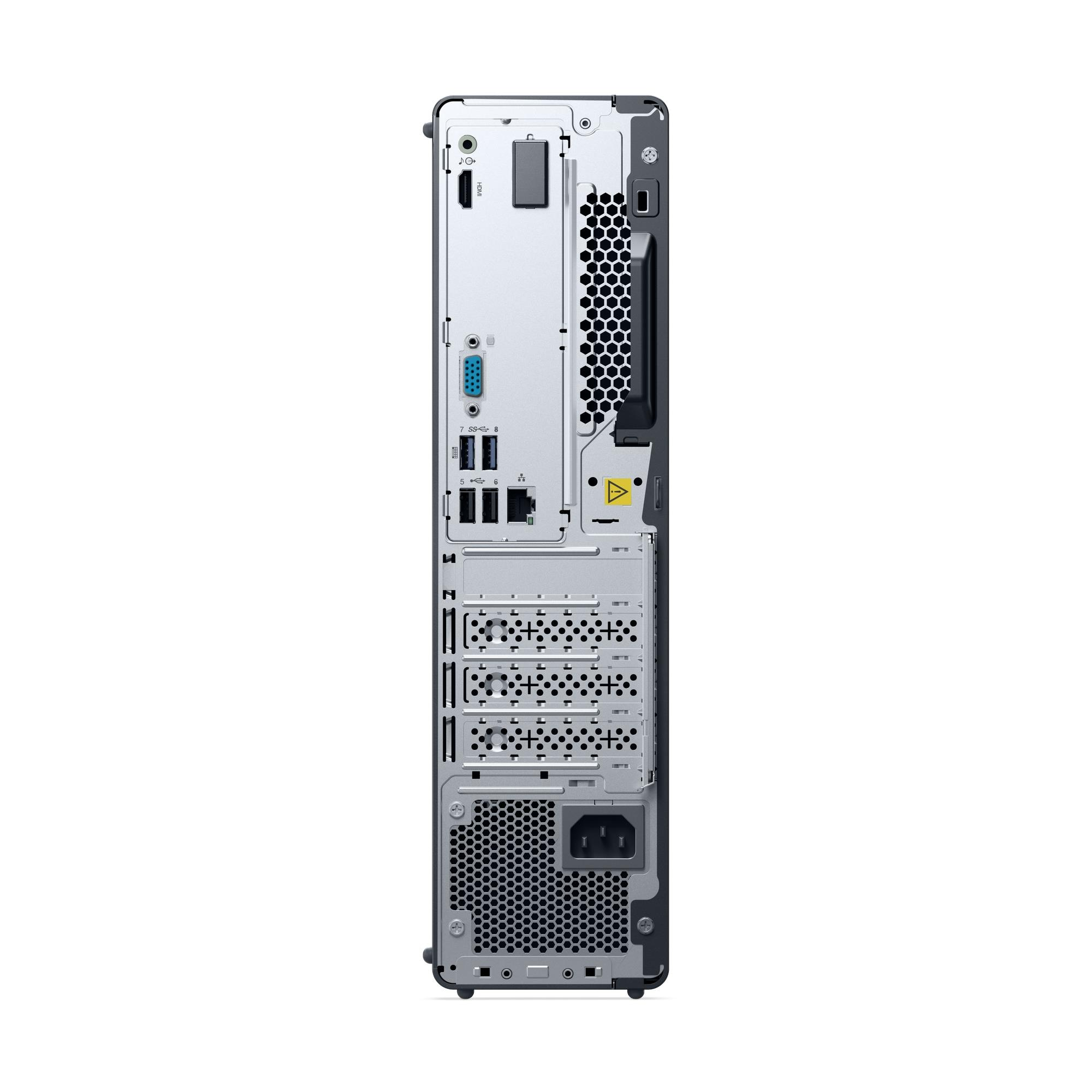
| USB-A (USB 2.0) | 2× USB-A (Hi-Speed USB 2.0) |
| USB-A (USB 5Gbps) | 2× USB-A (USB 5Gbps / USB 3.2 Gen 1) — one supports Smart Power On |
| HDMI | 1× HDMI® 2.1 TMDS |
| VGA | 1× VGA |
| Ethernet | 1× Gigabit Ethernet RJ-45, Realtek® RTL8111K |
| Audio Out | 1× line-out (3.5mm) |
| Optional Rear Ports | Parallel, serial, 2nd serial (via optional expansion) |
Wireless Connectivity
| Specification | Detail |
|---|---|
| Wi-Fi Options | Realtek Wi-Fi 6 RTL8852BE + Bluetooth 5.2 / Intel Wi-Fi 6 AX203 + Bluetooth 5.2 |
| WLAN Card Type | M.2 card |
| Ethernet | Gigabit (1GbE), onboard |
Security
| Specification | Detail |
|---|---|
| Security Chip | Firmware TPM 2.0, integrated in SoC |
| Physical Locks | Kensington® Security Slot™, Padlock Loop, optional Coded Lock, optional Smart Cable Clip |
| Chassis Intrusion | Chassis intrusion switch (selected models) |
| BIOS Security | Administrator / HDD / power-on passwords, Secure Boot, Self-Healing BIOS, Intel BIOS Guard, Smart USB Protection, Absolute Persistence Module, individual USB port disablement, configuration change detection, Secure Wipe |
Design & Physical
| Specification | Detail |
|---|---|
| Form Factor | SFF — Small Form Factor (8.2L) |
| Colour | Black chassis, grey bezel |
| Dimensions (W×D×H) | 92.5 × 291.7 × 339.5 mm |
| Weight | Approx. 4.63 kg |
| Expansion Slots | 1× PCIe 4.0 x16 low-profile / 1× PCIe 3.0 x1 low-profile |
| Bays | 1× 3.5″ disk bay / 1× slim ODD bay |
| Stand | Vertical stand (optional) |
| Smart Power On | Supported |
Power Supply
| Specification | Detail |
|---|---|
| Power Supply Options | 180W (85% efficiency) / 258W (90%) / 260W (90%, hybrid) |
| Voltage | AC 100–240V, 50–60Hz, autosensing |
Audio
| Specification | Detail |
|---|---|
| Audio Chip | Realtek® ALC623-CG HD Audio codec |
| Speaker | Single 1W integrated speaker (optional; no speaker also available) |
| Line Out | 1× 3.5mm (rear) |
Operating System
| Specification | Detail |
|---|---|
| Installed OS | No preloaded operating system |
| Compatible OS | Windows 11 Pro, Windows 11 Home, Windows 11 Home Single Language, Ubuntu Linux |
Certifications
| Category | Certifications |
|---|---|
| Environmental | ENERGY STAR® 8.0 (optional), EPEAT™ Silver / Gold (optional) |
| Noise | TÜV Rheinland® Low Noise / Ultra Low Noise (optional) |
Warranty
1-year courier/carry-in or 1-year limited onsite service (varies by model configuration)
Use Cases
Efficient Home Office and Small Business Workstations
The neo 30s Gen 5 suits professionals who need capable desktop performance but cannot justify the power draw or footprint of a full desktop-class machine. In particular, the i7-13620H’s mobile SoC architecture runs the machine considerably more efficiently than tower-class processors at equivalent core counts. Additionally, the 16GB dual-channel DDR5 configuration ships ready for demanding productivity tasks — including simultaneous browser sessions, cloud applications, video calls, and document workflows — without requiring an immediate memory upgrade.
Dual-Monitor Professional Setups
The rear panel carries both HDMI 2.1 and VGA simultaneously, so users connect a current 4K monitor alongside a legacy display in a true dual-screen arrangement. Consequently, this suits professionals who retain older monitors alongside newer hardware — a common scenario during phased office equipment refreshes. Furthermore, users who need more than two displays can add the optional Intel Arc A310 LP discrete graphics card to the PCIe 4.0 x16 slot for expanded output.
Storage-Intensive Deployments
Two available M.2 SSD slots allow users to expand on-device storage to up to 2TB total without replacing existing drives or adding external solutions. As a result, this machine suits users who work with large local datasets, high-resolution documents, or software installations that quickly fill a single 512GB drive. Moreover, both secondary M.2 slots accept PCIe 4.0 x4 NVMe drives, so expansion maintains full storage bandwidth rather than stepping down to slower interfaces.
Space-Constrained Office Environments
At 92.5 × 291.7 × 339.5 mm and 4.63 kg, the neo 30s Gen 5 occupies a compact desk footprint that suits hot-desking environments, shared workspaces, and offices where every centimetre of desk space counts. Furthermore, the optional vertical stand reduces the horizontal desk footprint further. Additionally, the lower power draw of the mobile i7-13620H SoC means the machine runs more quietly and generates less heat than desktop-class equivalents — a practical benefit in open-plan offices.
OS-Agnostic IT Deployments
The 13DK002MUM ships with no preloaded operating system, giving IT teams full control over image deployment from the first boot. In addition, the machine supports Windows 11 Pro, Windows 11 Home, and Ubuntu Linux, covering the range of corporate and open-source deployment environments. Consequently, this configuration suits organisations that maintain validated golden images and need a clean target machine rather than one pre-configured with a retail OS.
Considerations
Mobile Processor Architecture — Key Differences from Desktop-Class Machines
The i7-13620H uses a mobile SoC platform rather than a traditional desktop chipset. Consequently, it operates within lower thermal design parameters than a desktop i7, which means sustained peak performance under extreme multi-threaded loads may fall below what a desktop-class Core i7 (such as the i7-13700 in the ThinkCentre M70s Gen 5) delivers. However, for the vast majority of business productivity, office administration, and professional application workloads, the performance difference is not perceptible in daily use.
No Intel vPro Support
The neo 30s Gen 5 does not support Intel vPro® Enterprise. Therefore, IT teams who require out-of-band remote management, hardware-level threat detection, or KVM-over-network capabilities should instead evaluate the ThinkCentre M70s Gen 5, which supports the full vPro stack. The neo 30s Gen 5 does, however, include Smart Power On, Wake-on-LAN equivalent Smart Power On, and a comprehensive BIOS security suite for standard IT management scenarios.
Firmware TPM Rather Than Discrete TPM
The security chip on the neo 30s Gen 5 uses firmware TPM 2.0 integrated into the SoC rather than a discrete hardware TPM module. Consequently, some regulated or highly security-sensitive environments that mandate a discrete TPM should confirm this distinction against their compliance requirements before deploying this model. In contrast, the ThinkCentre M70s Gen 5 and neo 50s Gen 5 both carry discrete TPM 2.0 certified to FIPS 140-2.
No Card Reader
The neo 30s Gen 5 does not include a card reader — not even as an optional front-panel accessory. Therefore, users who routinely transfer data from SD cards or memory cards must use a separate USB card reader. This differs from the ThinkCentre M70s Gen 5, which supports an optional 3-in-1 front card reader.
No Operating System Included
The 13DK002MUM ships bare-metal. Consequently, this configuration targets IT-managed deployments with existing volume licences rather than end users expecting a ready-to-use machine. Buyers must supply and deploy their own OS licence and installation media before use.
Expansion Slot and HDD Bay Accessories
Adding a 3.5″ HDD to the available disk bay requires Lenovo’s screw and grommet kit, which Lenovo does not include in the standard box. Similarly, installing a slim optical drive requires the ODD bracket kit. Therefore, procurement teams planning to specify these additions at point of order should include the relevant kits explicitly to avoid delays on arrival.
Frequently Asked Questions
How Does the i7-13620H Differ from a Desktop i7 Processor?
The i7-13620H is a mobile-class processor designed for laptops and compact SFF desktops. Specifically, it operates at a lower Thermal Design Power than desktop Core i7 processors, which results in quieter, cooler operation and lower energy consumption. In contrast, desktop i7 processors — such as the i7-13700 in the ThinkCentre M70s Gen 5 — offer higher sustained multi-threaded throughput under peak load. For most professional productivity and office workflows, however, the real-world performance gap is not significant.
Can I Upgrade the RAM After Purchase?
Yes. The two DDR5 SO-DIMM slots accept up to 64GB DDR5-5200 total. Furthermore, this 16GB configuration already ships with both slots populated in dual-channel mode. Therefore, upgrading requires replacing both existing DIMMs with higher-capacity modules rather than simply adding a second DIMM.
Can I Add a Second SSD?
Yes. The chassis provides two M.2 SSD slots — the installed 512GB drive occupies one, and the second slot accepts an additional M.2 NVMe SSD of up to 1TB. Additionally, both slots support PCIe 4.0 x4 drives, so the second drive operates at full NVMe speeds rather than on a slower legacy interface.
Does This Machine Support Wi-Fi?
Wi-Fi options include Realtek Wi-Fi 6 (802.11ax, Bluetooth 5.2) and Intel Wi-Fi 6 AX203 (802.11ax, Bluetooth 5.2). Buyers should confirm which wireless card ships in the 13DK002MUM configuration at point of order. Wired Gigabit Ethernet via Realtek RTL8111K is confirmed as the standard onboard network connection.
How Many Monitors Can I Connect?
The integrated Intel UHD Graphics drives up to two independent displays simultaneously via the rear HDMI 2.1 and VGA ports. However, adding the optional Intel Arc A310 LP discrete graphics card in the PCIe 4.0 x16 slot expands output for users who need more screens or GPU-accelerated workloads.
What Operating Systems Does This Machine Support?
The 13DK002MUM ships with no preloaded OS and supports Windows 11 Pro, Windows 11 Home, Windows 11 Home Single Language, and Ubuntu Linux. Consequently, IT teams can apply their validated corporate image immediately on arrival.
How Does This Compare to the ThinkCentre neo 50s Gen 5?
Both machines share the same 8.2-litre SFF chassis footprint, DDR5 memory, and PCIe 4.0 NVMe storage. However, the neo 50s Gen 5 uses a desktop-class Intel Core i7-14700 processor with a discrete TPM 2.0 (FIPS 140-2 certified), a B760 chipset with three-display support via HDMI, DisplayPort, and VGA simultaneously, and an additional rear VGA port alongside DisplayPort 1.4. In contrast, the neo 30s Gen 5 uses a mobile i7-13620H SoC with firmware TPM, limits rear video to HDMI and VGA only (no DisplayPort), but benefits from a PCIe 4.0 x16 expansion slot, three M.2 slots, and a lighter weight of approximately 4.63 kg versus the neo 50s Gen 5’s approximate 4.2 kg — though with a slightly larger depth of 291.7mm versus 291.4mm.
For compatible monitors, memory upgrade kits, and ThinkCentre accessories, see our Lenovo ThinkCentre desktop accessories.
For full technical documentation and configuration options, visit the Lenovo ThinkCentre neo 30s Gen 5 official product page.

Reviews
There are no reviews yet.